Atlassian Marketplace · Forge-native apps

Atlassian apps that fix
expensive problems.

Taskhooker builds Marketplace apps for Jira, Confluence, JSM and JPD admins. Every app runs inside Atlassian's Forge runtime — your data never leaves — and every recommendation arrives in dollars.

Forge-native · dollars in every output · reversible by design · made in Melbourne
The portfolio

Three apps. All fix something that costs you time or money.

One reclaims wasted license spend across your whole Atlassian suite. One ends a daily annoyance for every Confluence writer — for free. One stops your teams retyping the same Jira work items. All built the same careful way.

Recoup — License Cost Optimizer
The problem

Your Atlassian bill is overpaid.

Every Atlassian seat renews whether the person logs in or not. Leavers HR offboarded but IT never disabled. People paying for Confluence who live in Jira. JPD Creator seats parked on people who never open it. None of it shows up on an invoice — it just quietly recurs, every month.

Recoup audits every seat across Jira, Confluence, JSM and JPD and tells you exactly how much is on the table. In dollars. Every scan.

SCAN #4271 · 1,200 USERS · 8 SEC

INACTIVE USERS87 users
Jira (Standard)$710 / mo
Confluence$217 / mo
PRODUCT MISMATCHES142 users
Confluence dormant$612 / mo
JPD CREATOR WASTE22 users
→ Contributor (free)$220 / mo
SERVICE ACCTS PROTECTED14

TOTAL POTENTIAL SAVINGS
$1,759 / mo
= $21,108 / year reclaimed
The pain points

Four ways the money leaks.

Most license-cleanup tools count inactive logins and stop there. Recoup opens every drawer at once — and the cleanup itself is where teams get hurt.

01 · INACTIVE USERS

People who left, but kept their seat.

$8 – 22 / seat / mo

An average org carries ~7% of users who haven't touched any Atlassian product in 90+ days — the ones HR offboarded but IT never disabled.

02 · PRODUCT MISMATCH

Paying for Confluence. Living in Jira.

~12% of multi-product users

Multi-product seats where one product sits dormant. The cleanest win in license optimisation — and one no inactive-user counter ever surfaces.

03 · JPD CREATOR WASTE

Creator seats no one opens.

$10 / Creator seat / mo

Jira Product Discovery's Creator tier is $10/mo. Contributor is free. The highest per-seat reclaim Recoup detects — a one-click downgrade.

04 · THE CLEANUP FEAR

Cut off a bot, break three teams.

the reason it never gets done

The risk of disabling a service account, and no audit trail for finance, is why most orgs never clean up at all. Recoup removes that risk by design.

The solution

Find it, price it, reclaim it — reversibly.

Recoup installs as a Forge app inside Jira and runs against your real org. Here is what you act on, first scan in.

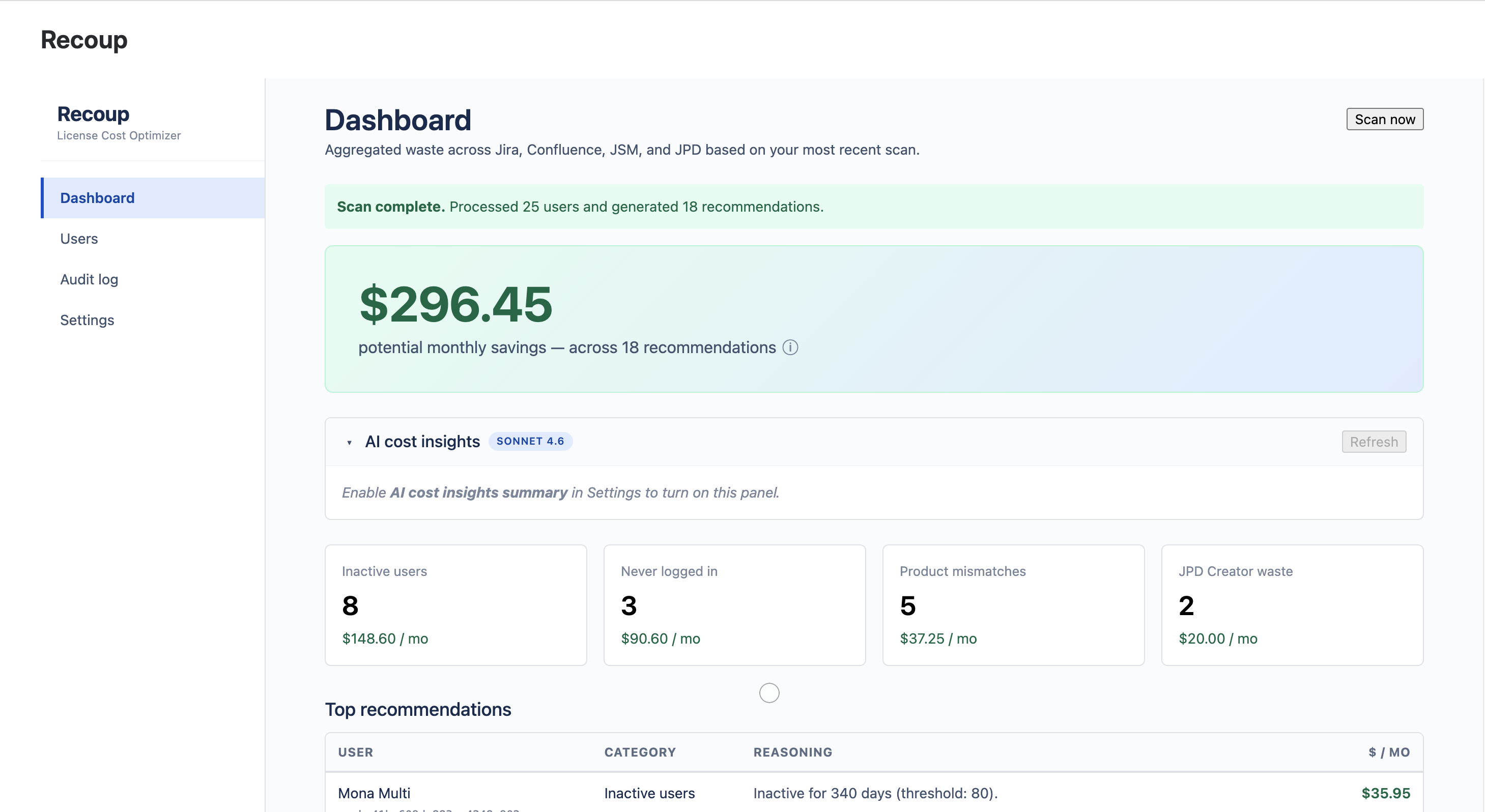
Recoup dashboard headlining total monthly savings broken into four waste categories
DASHBOARD — the first surface after install

One dashboard. One number finance understands.

Recoup unifies Jira, Confluence, JSM and JPD into a single dollar-denominated view. No more "X inactive users" — instead "$1,247 / month reclaimable, here's where." Click any waste category to drill into the exact users behind it.

  • Cross-product scan — ~100 users / second
  • Three detectors: inactive, product mismatch, JPD Creator
  • Recommendations ranked by dollar impact
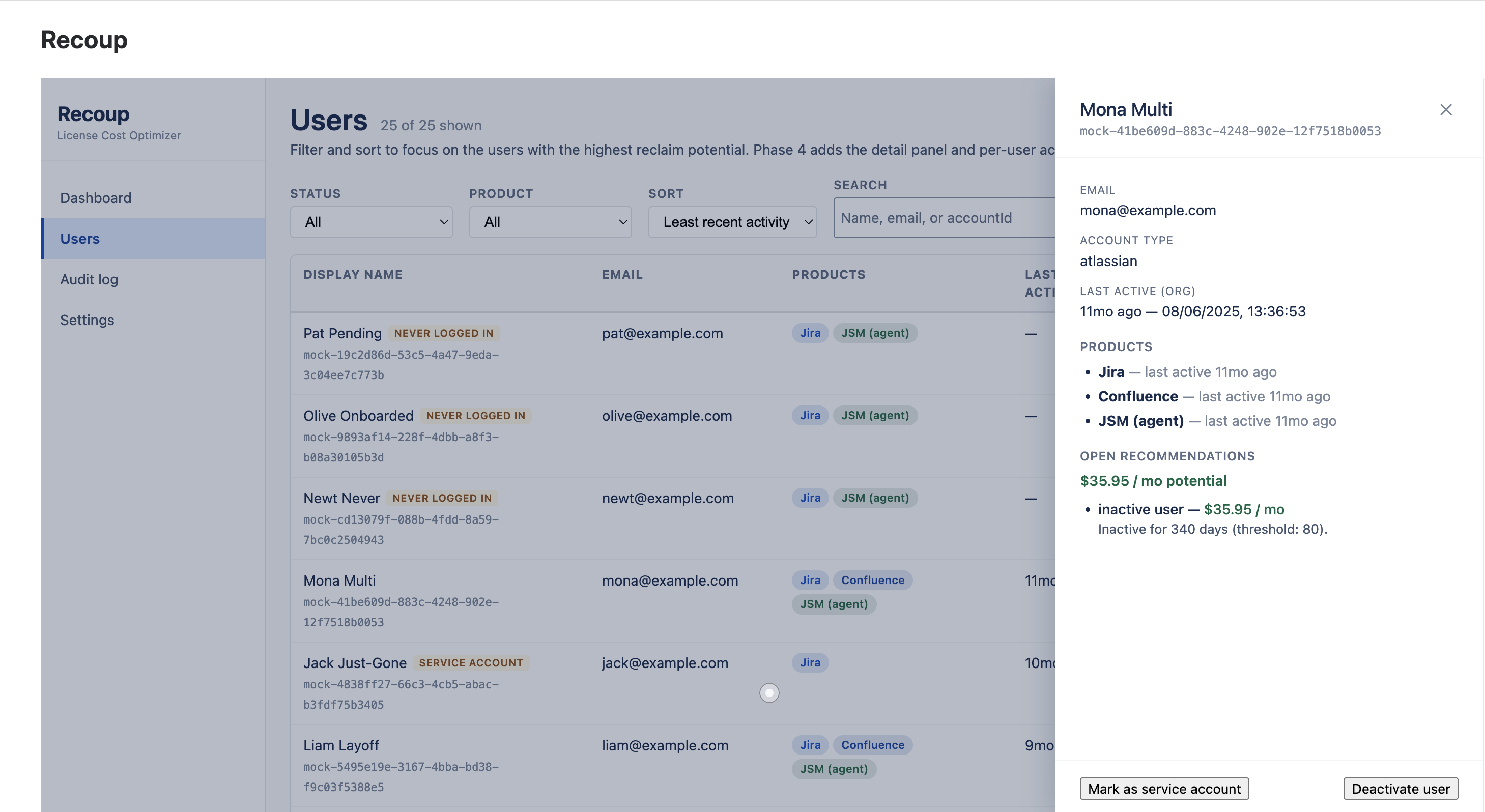
Recoup user detail panel showing per-product activity and a reversible reclaim recommendation
USER DETAIL — drill in, decide, document

Reversible by design — never destructive.

Reclaiming a seat removes the user from the Jira/JSM access group you mapped — Atlassian stops billing them, and one-click Add back undoes it instantly. Recoup never deletes, suspends or hard-deactivates accounts. Identity and SSO stay untouched.

  • Per-product activity timeline per user
  • Every recommendation in plain language, in dollars
  • Reclaim requires a typed reason — recorded in the log
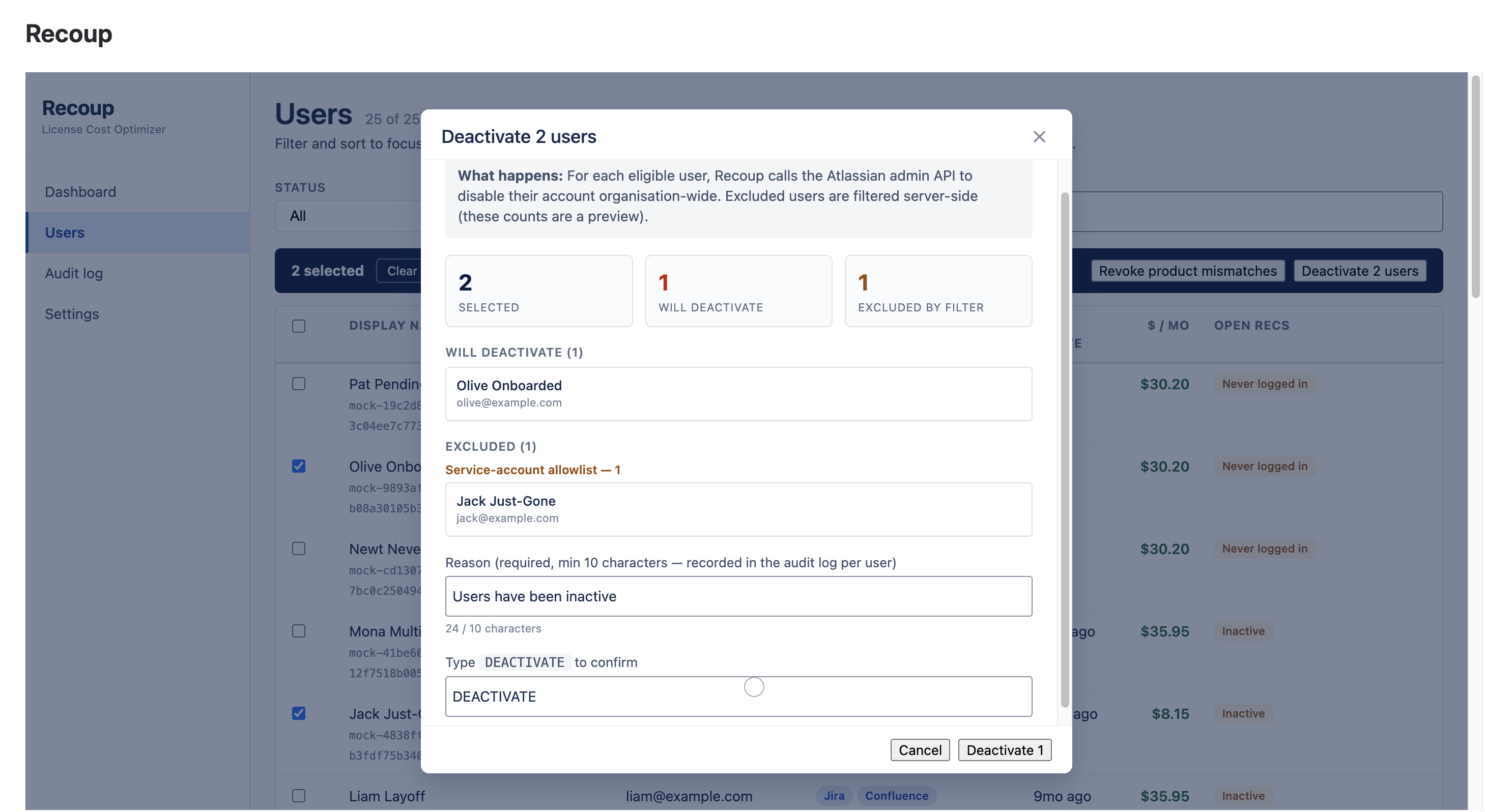
Recoup bulk reclaim modal with eligible users and excluded service accounts grouped by reason
BULK RECLAIM — safety rails before you confirm

The #1 cleanup mistake — solved.

Reclaim up to 50 seats at once. Recoup flags likely service, bot and integration accounts with deterministic rules and excludes them server-side — alongside org admins and your own account. The modal shows you exactly who's excluded, and why, before you click.

  • Rule-based service-account detection
  • Server-enforced exclusions — not just client-side
  • Typed REMOVE confirmation gates every bulk action
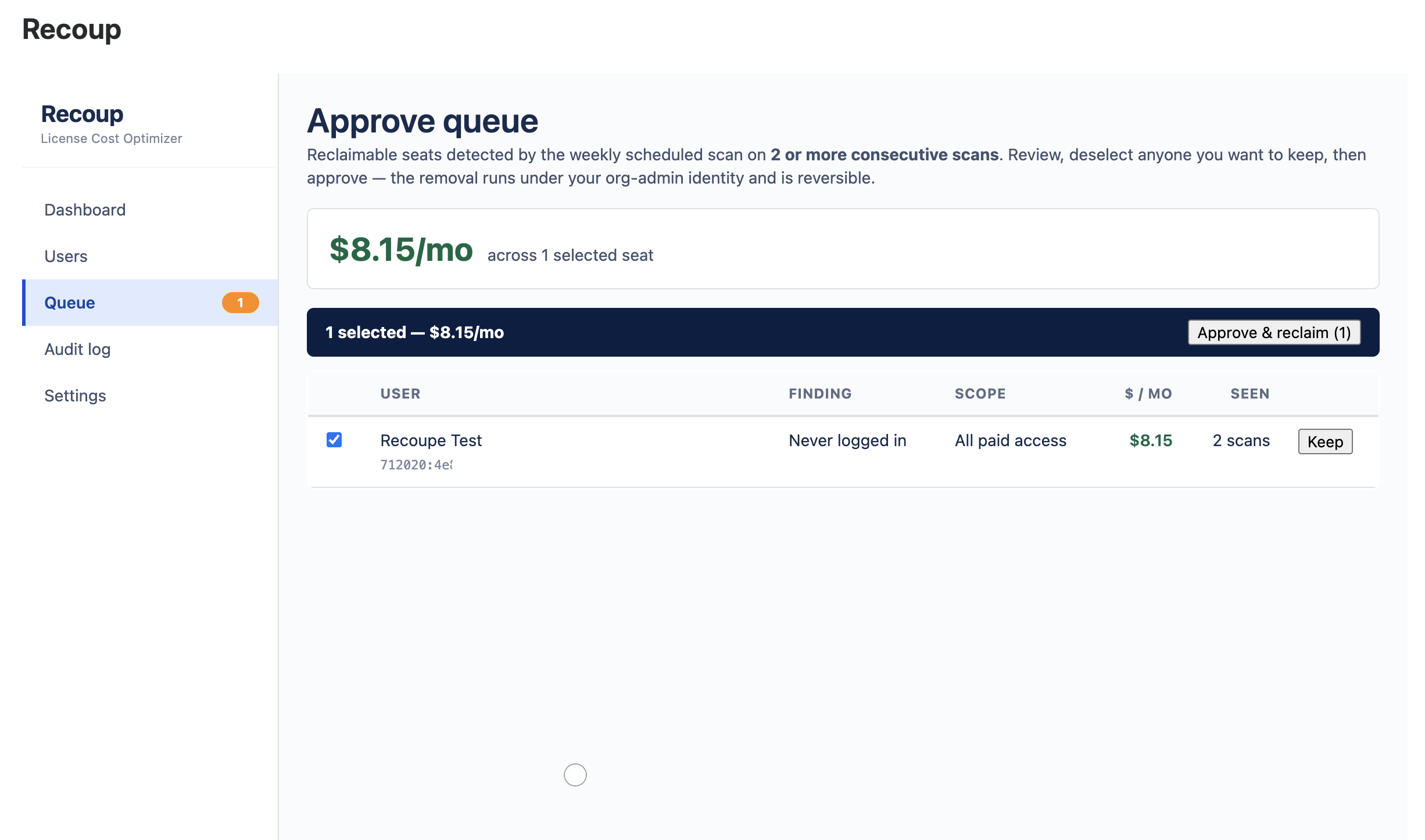
Recoup approve queue — seats confirmed as waste on two consecutive scans, one click to reclaim
APPROVE QUEUE — waste finds itself, you hold the button

Waste finds itself. You still approve it.

A scheduled scan re-audits every seat each week, read-only. A seat reaches the queue only after it's flagged on two consecutive scans — never a one-off blip. Review the list, keep anyone with one click, clear the rest with one more. Nothing is ever removed without a human.

  • Weekly scheduled detection, fully automatic
  • No autonomous removal path exists — by design
  • Same rails: reversible, audited, service-accounts safe
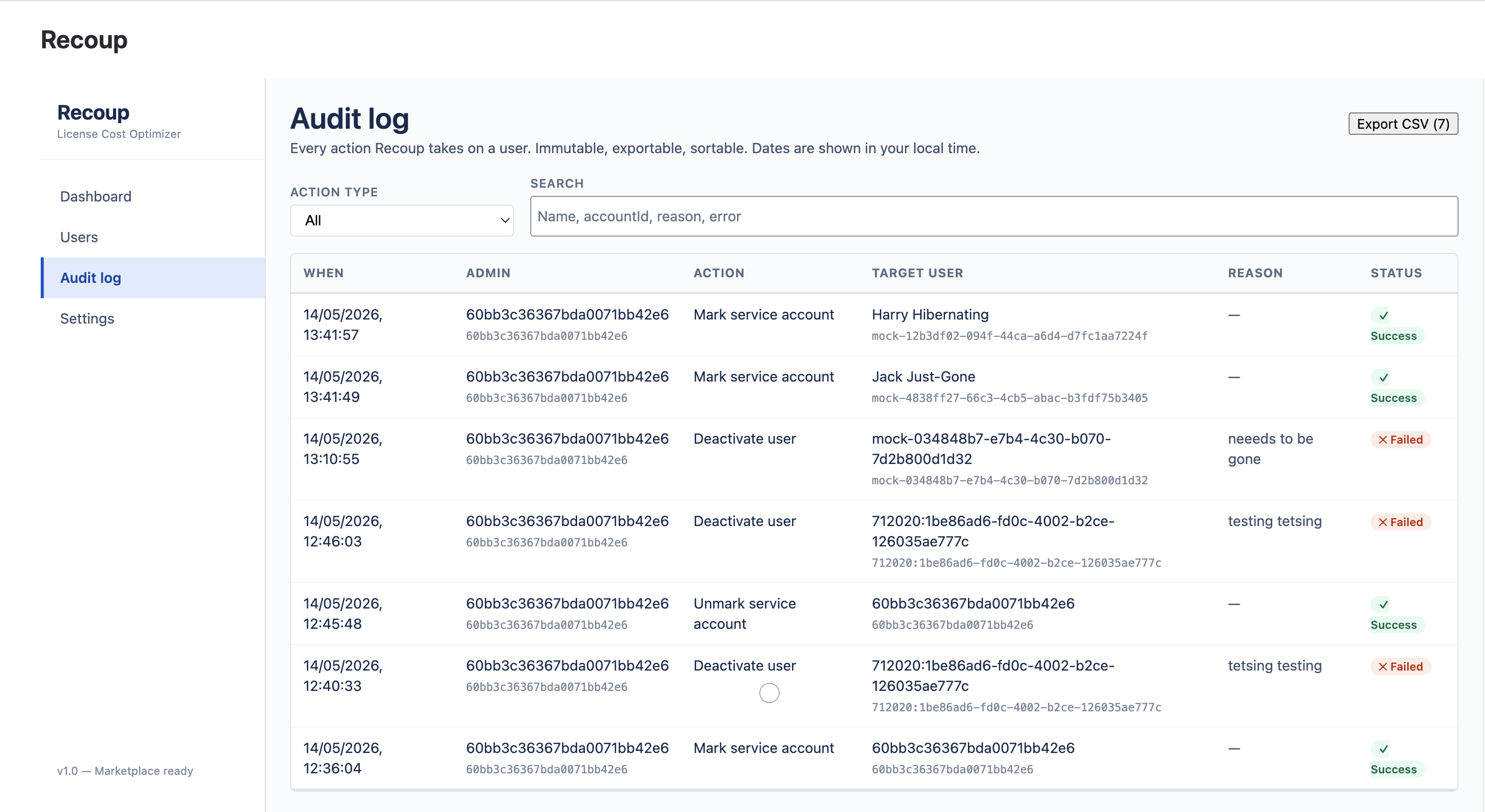
Recoup audit log with successful and refused actions, exportable as CSV
AUDIT LOG — immutable, exportable, finance-ready

The security review writes itself.

Every action a Recoup admin takes is recorded with a full before/after diff — successes and refusals alike. Each row carries the required reason written by the admin who acted. Export to CSV, formatted for FP&A and security reviews.

  • Immutable audit trail, every attempt
  • CSV export with the columns finance needs
  • Zero data egress — all of it inside Forge
Recoup · pricing

One price. Pays for itself on the first scan.

Most customers reclaim many times the subscription cost in the very first scan. 30-day free trial, no credit card, cancel any time.

Recoup · Standard
$1.50
per Atlassian user · per month · USD
  • Cross-product scan engine
  • Inactive · Mismatch · JPD detectors
  • Rule-based service-account guard
  • Reversible bulk seat reclaim (up to 50)
  • Scheduled detection + approve queue
  • Immutable audit log + CSV export
  • Forge-hosted, encrypted at rest
Get Recoup on the Marketplace Need enterprise pricing?

Atlassian volume discounts apply automatically — ~20% off at 100+ seats, ~35% at 500+. For 5,000+ seats or annual prepay, talk to us.

Word Count for Confluence
The problem

Confluence still has no word count.

Writers, translators and content teams need it constantly — for quotes, for limits, for sign-off. So they copy the whole page into some random web counter, wait, and copy it back. Every time. On internal documentation that should never leave the building.

Word Count puts the number where it belongs: in the page byline, the moment the page loads.

The solution

Always visible. Stores nothing.

A live count for every page, plus a full breakdown one click away — computed on Atlassian's Forge platform from the page you're already viewing.

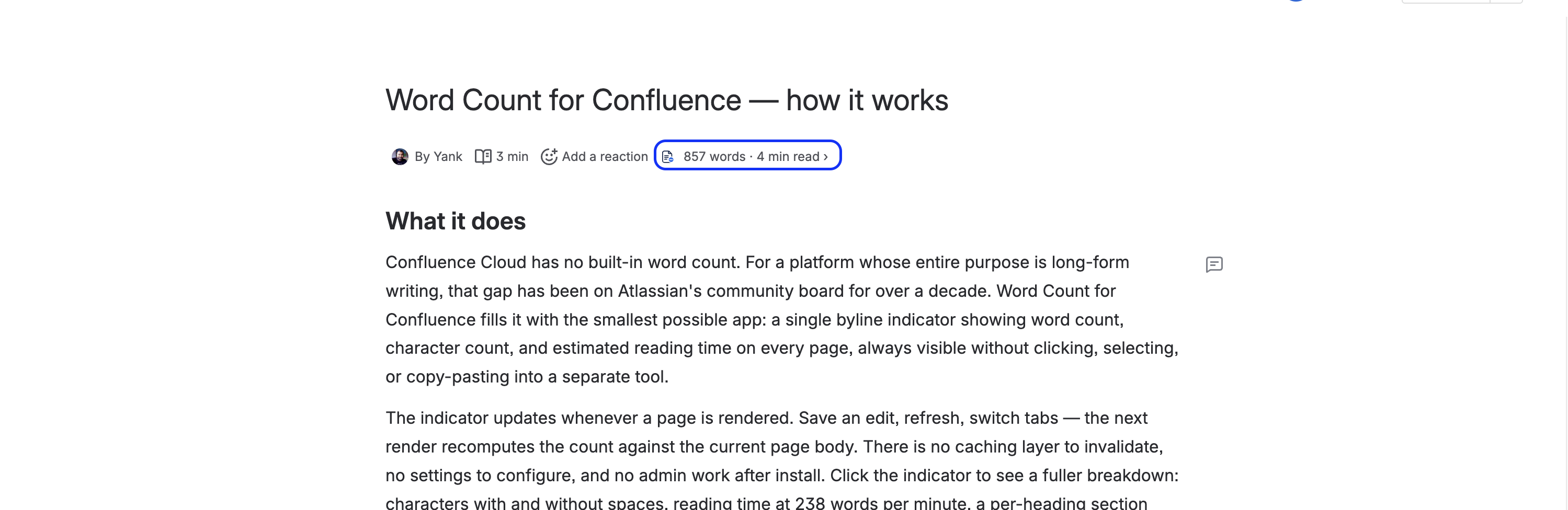
Word count, character count and reading time shown live in a Confluence page byline
THE BYLINE — count is there the moment the page loads

Live in every byline.

Word count, character count and reading time sit right next to the avatar and timestamp at the top of every page — no clicking, no highlighting, no copy-pasting into another tool. The count refreshes every time the page renders.

  • Words, characters and reading time, always on
  • Reading time at 238 wpm — the adult-reading average
  • Works on every Confluence page, automatically
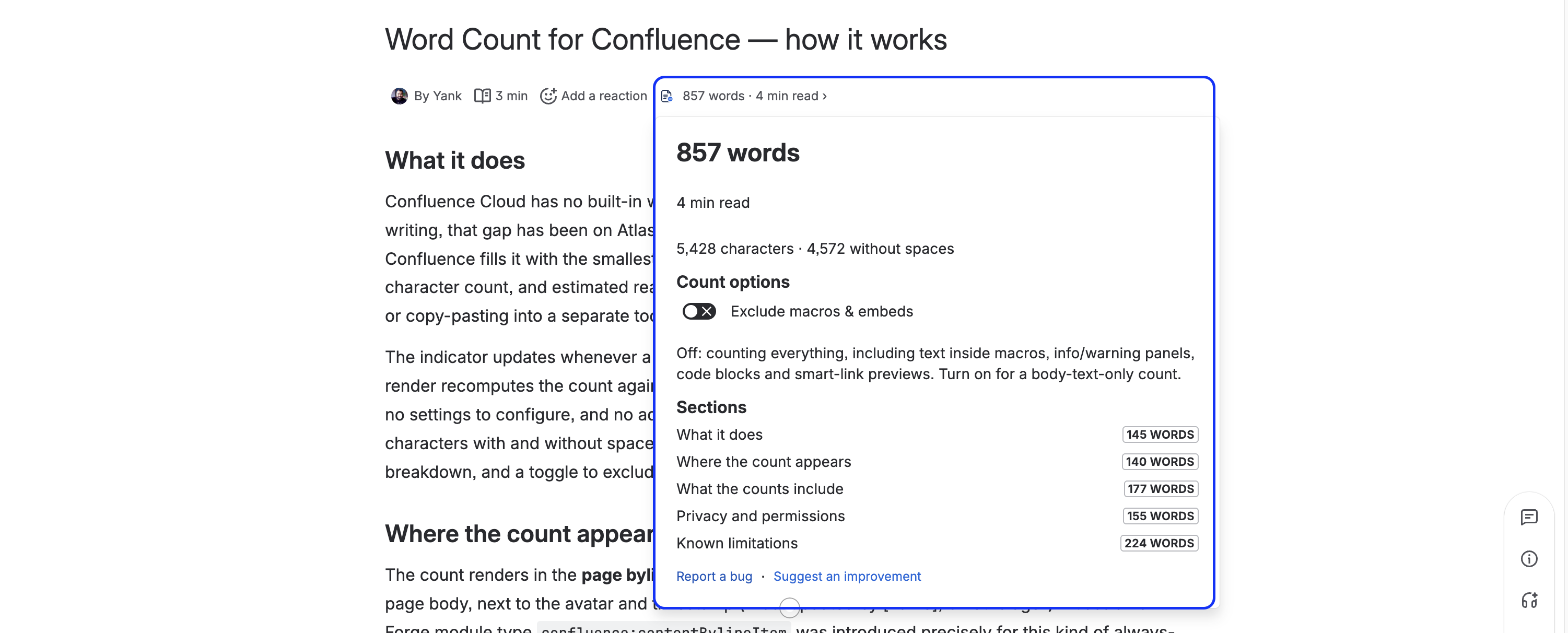
Word Count expanded panel showing words, characters with and without spaces, and reading time
EXPANDED PANEL — the full breakdown on click

The full breakdown, one click away.

Click the byline for words and characters — with and without spaces — and estimated reading time, laid out clearly. Everything a writer or translator needs to quote, scope or sign off a page.

  • Characters with and without spaces
  • Clean, readable panel — no clutter
  • Report-a-bug / suggest links built into the footer
Word Count per-heading section breakdown with word-count lozenges
SECTIONS — a per-heading word-count breakdown

See the weight of every section.

A per-heading breakdown shows the word count for each section of the page — so you can spot the bloated parts, balance a doc, or quote on a single section without doing the maths yourself.

  • One row per heading, with a word-count lozenge
  • Find the heavy sections at a glance
  • Great for long docs and structured runbooks
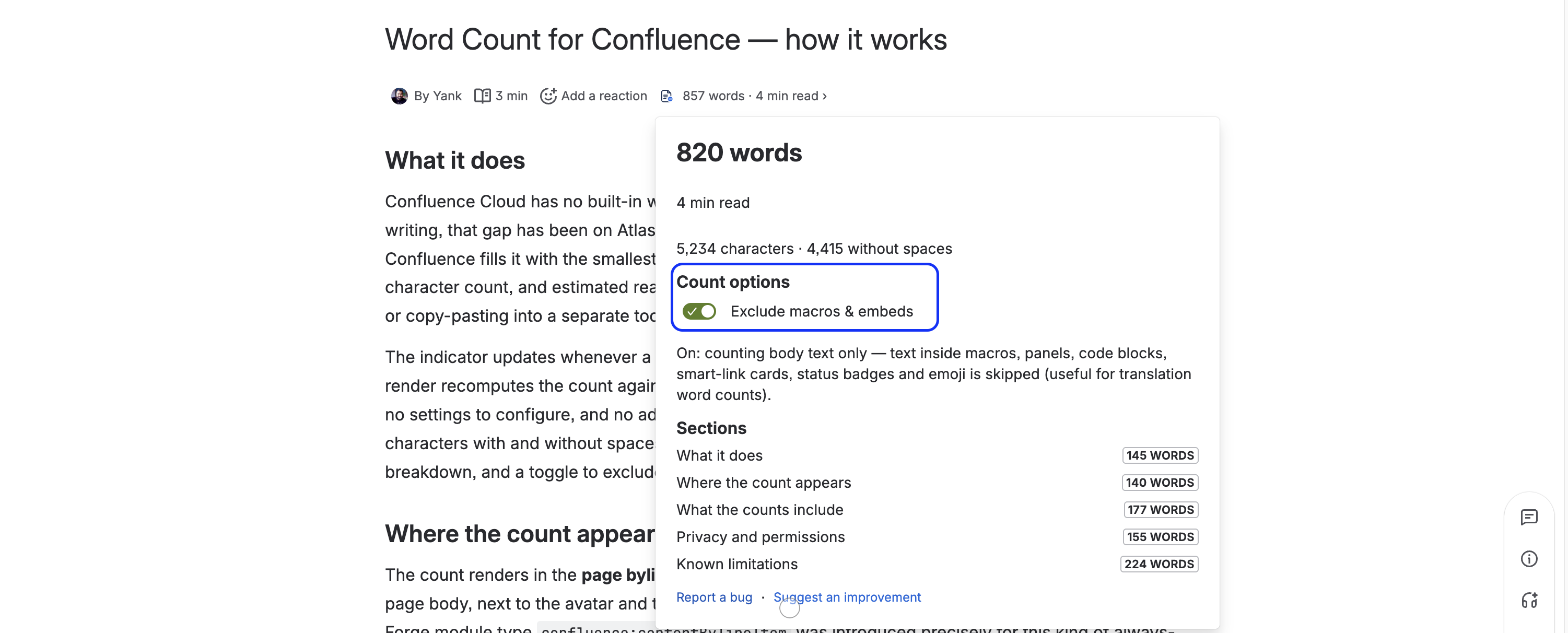
Word Count exclude-macros toggle for a body-only count
EXCLUDE MACROS — a translator-friendly body-only count

Body-only count — and privacy as a feature.

A one-tap toggle excludes macros and embeds — code blocks, panels, smart links, status badges — for a clean body-text count translators can quote on. And the whole app stores nothing and sends nothing: no database, no analytics, no third-party calls.

  • Exclude macros & embeds with one tap
  • Two read-only scopes, both pinned in the manifest
  • Zero storage, zero egress — one of the safest apps you can add
Install Word Count — free Free forever · zero storage · two read-only scopes
Issue Templates for Jira
The problem

Every team retypes the same work items.

Bug reports, release checklists, onboarding epics — the same fields and the same sub-task breakdown, typed out by hand every single time, and slightly differently in every project.

Issue Templates prefills the Jira Create screen the instant you pick a template — fields, labels, description, and a whole Epic → Story → Subtask tree — across one project or every project at once. Works on Jira Software, Jira Work Management, and Jira Service Management.

Apply Template ★ Bug report
Summary[Bug] prefilled ✓
Labelsbug · triage ✓
ChildrenInvestigate · Fix · Verify ✓
picked once — fields fill live, sub-tasks created on submit
The solution

Pick once. The form fills itself.

Author a template once, then apply it right on the Jira Create screen — fields, labels, description and a whole work-item tree — computed on Atlassian's Forge platform, with nothing leaving your tenancy.

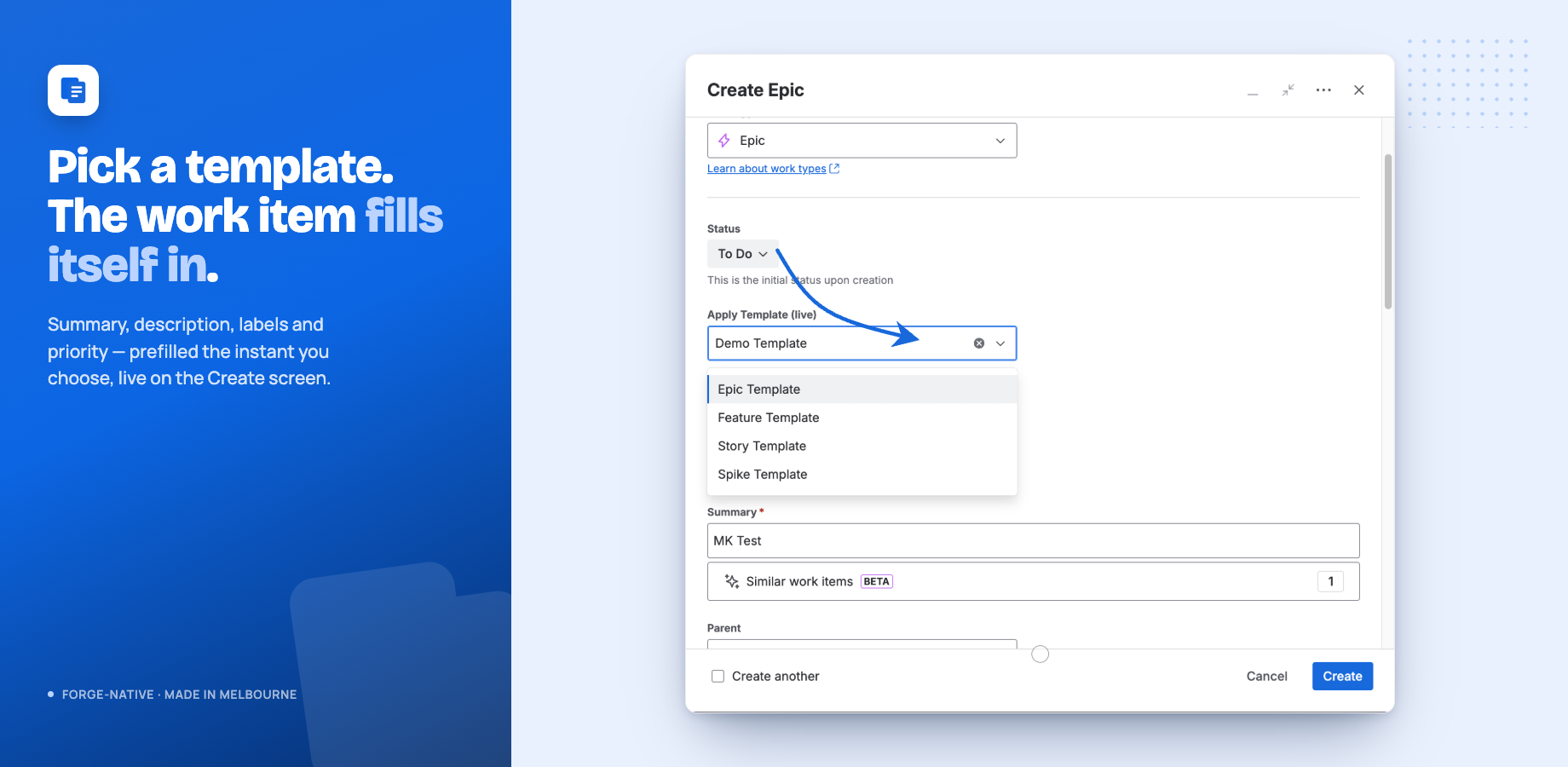
The Apply Template field on the Jira Create screen, with summary, description and labels filled in live
THE CREATE SCREEN — pick a template, fields fill live

Instant prefill, right where you create.

Choose a template in the Apply Template field and the work item fills itself in the instant you pick it — summary, description, labels and priority. No retyping, no copy-pasting the same structure into every new issue.

  • Fields prefill live, before you submit
  • Set a default template per project and work type
  • Built to load near-instantly — never slows Create down
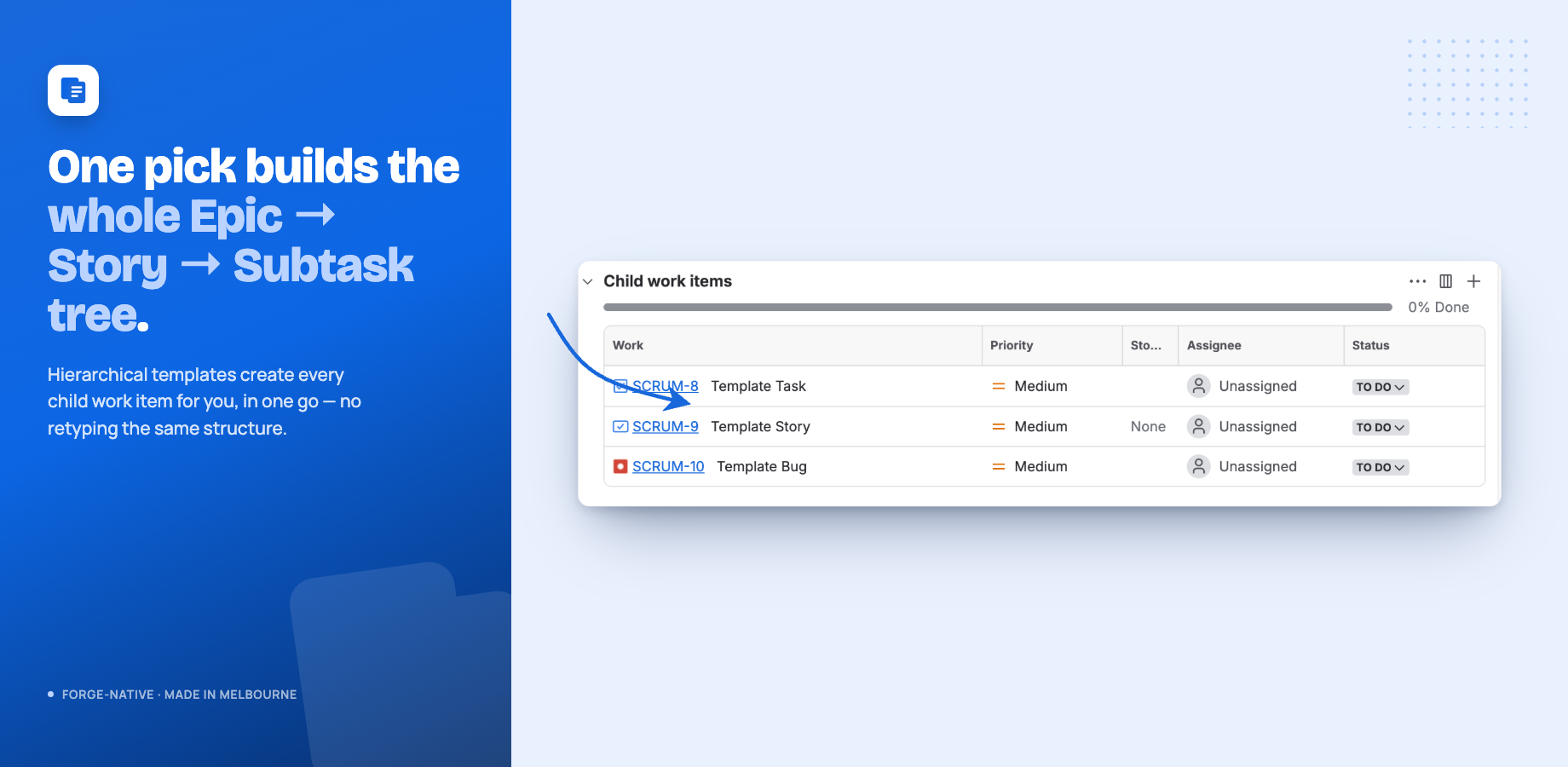
A full Epic to Story to Subtask tree created automatically from a single template pick
HIERARCHIES — a whole Epic → Story → Subtask tree in one pick

Whole hierarchies in one action.

Hierarchical templates create every child work item for you — a full Epic → Story → Subtask tree from a single pick, named and parented automatically. Repeatable processes get created the same correct way every time.

  • Epic → Story → Subtask trees built on submit
  • Children named and parented for you
  • No manual sub-task entry, ever again
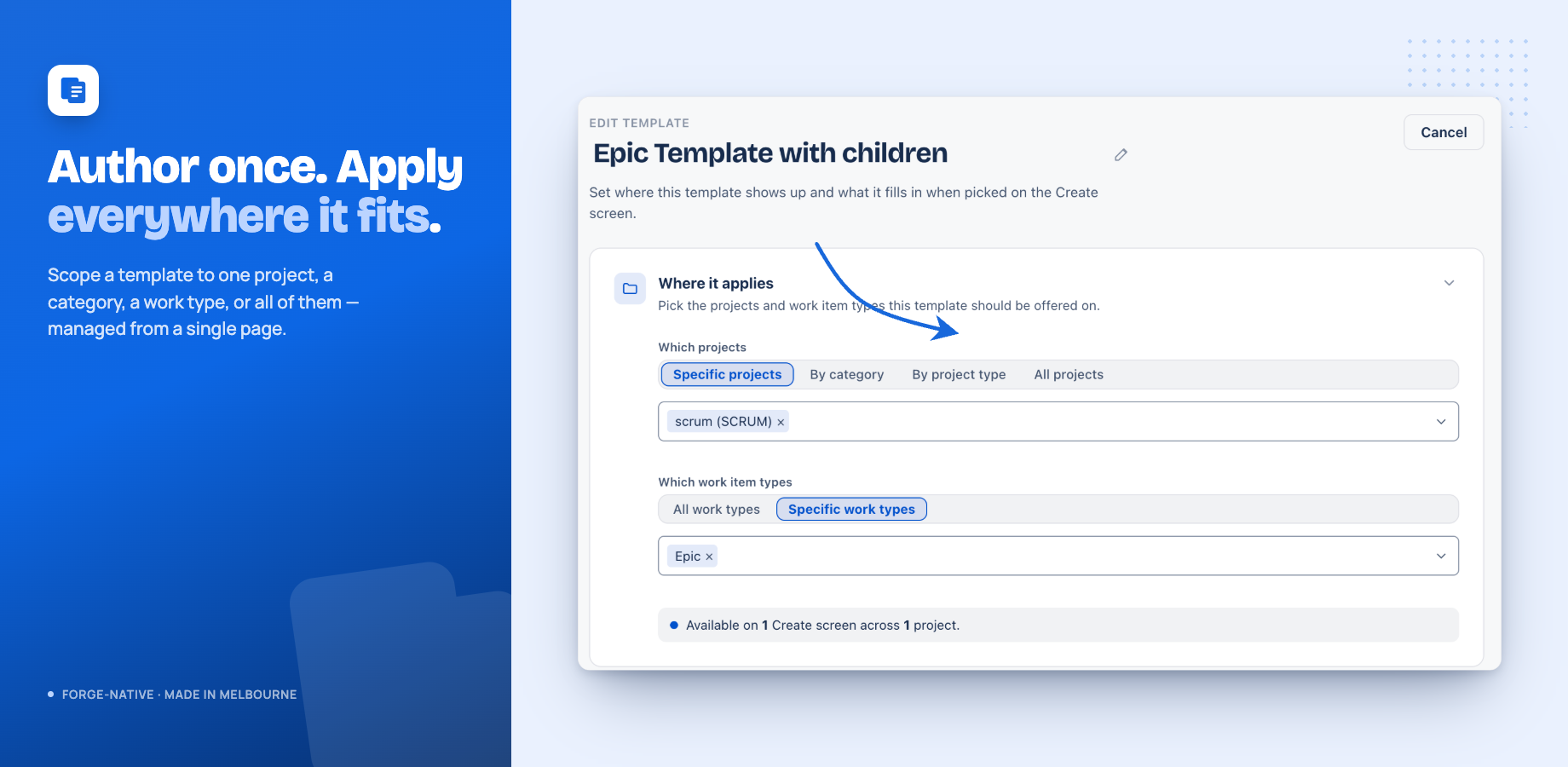
The authoring page choosing where a template applies — specific projects, a category, a project type, or all projects
SCOPE — one project, a category, a type, or all

Scope it once, apply it everywhere.

Author a template once and scope it to a single project, a category, a work type, or every project at once — managed from one authoring page. New projects that match a broad scope are picked up automatically.

  • Specific projects, a category, a project type, or all
  • Works on Jira Software, Work Management and Service Management
  • Admin-only authoring, verified on every action
Install Issue Templates Free for up to 10 users · company-managed · zero external egress
What every Taskhooker app shares

Built like an accountant would.

Same principles across the whole portfolio. Hosted by Atlassian Forge, nothing leaves your tenancy, nothing destructive, every output you can defend in a review.

§

Forge-native

All processing happens inside Atlassian's runtime. No third-party servers, no AI vendor, no shadow IT, no data leaving your region.

$

Dollars in every output

If a recommendation can't be priced, it doesn't ship. Admins and finance see savings, not abstract counts.

Reversible by design

Every action an app takes is one click from undo. Nothing auto-deactivates, nothing is destroyed.

Zero egress

Minimal, transparent scopes and no outbound calls beyond Atlassian's own APIs. The security review writes itself.

FAQ

Questions about Taskhooker.

More questions? Email support@taskhooker.com — answers usually within a few hours.

What does Taskhooker make? +

Taskhooker builds Forge-native apps for the Atlassian Marketplace. There are three: Recoup (finds and reclaims wasted Atlassian licenses across Jira, Confluence, JSM, and JPD, in dollars), Word Count for Confluence (live word count and reading time in every page byline), and Issue Templates (reusable Jira templates that prefill the Create screen, including full Epic → Story → Subtask trees).

Does my data leave Atlassian? +

No. Every Taskhooker app runs entirely on Atlassian Forge — Atlassian hosts every function call and every storage write. We operate no third-party servers, and we use no analytics, telemetry, or AI vendors. Your data never leaves Atlassian's infrastructure.

Are the apps free? +

Word Count for Confluence is completely free. Issue Templates is free for small teams (up to 10 users). Recoup is a paid app for organisations on the Atlassian stack — see its pricing. Current pricing for each app is on its Atlassian Marketplace listing.

What is Atlassian Forge? +

Forge is Atlassian's hosted platform for building Marketplace apps. Apps run inside Atlassian's own sandboxed runtime and store data in Forge Key Value Store (encrypted at rest, tied to your site's data region). Building on Forge is why Taskhooker apps need no external servers and keep your data inside Atlassian.

Which Atlassian products do you support? +

Jira, Confluence, Jira Service Management, and Jira Product Discovery on Atlassian Cloud. Recoup spans all four; Issue Templates covers Jira — including Jira Software, Jira Work Management, and Jira Service Management; Word Count is for Confluence.

Where is Taskhooker based, and how do I get support? +

Taskhooker is based in Melbourne, Australia. Email support@taskhooker.com for help with any app — replies usually land within a few hours.

Fix something expensive this week.

Start free with Word Count or Issue Templates, or put a dollar figure on your Atlassian waste with Recoup. Each installs from the Marketplace in under a minute.

Questions from your security team or CFO? Email support@taskhooker.com — answers usually within a few hours.

Contact

Questions? Send us a note.

A security review, a CFO question, enterprise pricing, or a feature you wish existed — tell us. Replies usually land within a few hours, from a real person in Melbourne.

Prefer email? support@taskhooker.com