Atlassian Marketplace · Forge-native apps

Atlassian apps that fix
expensive problems.

Taskhooker builds Marketplace apps for Jira, Confluence, JSM and JPD admins. Every app runs inside Atlassian's Forge runtime — your data never leaves — and every recommendation arrives in dollars.

Forge-native · dollars in every output · reversible by design · made in Melbourne
The portfolio

Six apps. All fix something that costs you time or money.

One reclaims wasted license spend across your whole Atlassian suite. One ends a daily annoyance for every Confluence writer — for free. One stops your teams retyping the same Jira work items. One replaces black-box Jira scripting with automation you can actually see. One turns a Jira search into a live chart on the page, for whoever's looking. And the newest turns any Confluence table into a filtered, pivoted, interactive report — in one macro. All built the same careful way.

Recoup Paid · 30-day trial

Recoup

License Cost Optimizer for Atlassian Cloud

Scans Jira, Confluence, JSM and JPD for inactive users, product mismatches and idle JPD Creator seats. Every finding in dollars. Reversible, identity-safe seat reclaim — never auto-deactivates anyone.

Explore Recoup
Word Count for Confluence Free

Word Count

Live word count in the Confluence byline

Word count, character count and reading time on every Confluence page, right in the byline — no clicking, no copy-pasting into another tool. Zero storage, zero egress, two read-only scopes.

Explore Word Count
Issue Templates for Jira Free · up to 10 users

Issue Templates

Reusable templates that prefill the Jira Create screen

Pick a template and the work item fills itself in — fields, smart values, description, and a whole Epic → Story → Subtask tree. Apply to new or existing work items; govern with roles, import/export, and an examples gallery.

Explore Issue Templates
Hooks for Jira New · in development

Hooks

Jira scripts that show their work

A ScriptRunner alternative: scripts run on work-item events, plain-words schedules, or thousands of work items at once — with every run's logs, timing, and errors replayable, version history, one-click rollback, and dry-run.

Explore Hooks
Bespoke Charts & Reports for Confluence and Jira New · submission pending

Bespoke

Jira Charts & Reports for Confluence

Chart live Jira data on a Confluence page — pie, donut, bar, stacked bar, or KPI — from a JQL search or a saved filter. Every viewer sees data filtered to their own Jira permissions. Zero app storage.

Explore Bespoke
Sift — Table Filters, Pivots & Charts for Confluence Paid · 30-day trial

Sift

Table Filters, Pivots & Charts for Confluence

Filter, pivot, and chart any table on the page, an attached CSV/TSV/JSON file, or pasted data — in one macro. Readers sort, filter, search, and export CSV without edit rights. Zero app storage.

Explore Sift
HTML for Confluence Pages Paid · 30-day trial

HTML

HTML for Confluence Pages

Write HTML, CSS and JavaScript on any page — real code editor, live preview, sanitization profiles, admin guardrails. Renders in a sealed sandbox and never leaves Atlassian. Zero storage of page content.

Explore HTML
Showdown New · coming soon

Showdown

Planning Poker for Jira Sprint Estimation

Estimate as a team without leaving Jira — live rooms with hidden votes and a discussion timer, async voting across time zones, or bucket sizing on a shared board. Agreed estimates save straight to Story Points. Runs on Atlassian.

Explore Showdown
Recoup — License Cost Optimizer
The problem

Your Atlassian bill is overpaid.

Every Atlassian seat renews whether the person logs in or not. Leavers HR offboarded but IT never disabled. People paying for Confluence who live in Jira. JPD Creator seats parked on people who never open it. None of it shows up on an invoice — it just quietly recurs, every month.

Recoup audits every seat across Jira, Confluence, JSM and JPD and tells you exactly how much is on the table. In dollars. Every scan.

SCAN #4271 · 1,200 USERS · 8 SEC

INACTIVE USERS87 users
Jira (Standard)$710 / mo
Confluence$217 / mo
PRODUCT MISMATCHES142 users
Confluence dormant$612 / mo
JPD CREATOR WASTE22 users
→ Contributor (free)$220 / mo
SERVICE ACCTS PROTECTED14

TOTAL POTENTIAL SAVINGS
$1,759 / mo
= $21,108 / year reclaimed
The pain points

Four ways the money leaks.

Most license-cleanup tools count inactive logins and stop there. Recoup opens every drawer at once — and the cleanup itself is where teams get hurt.

01 · INACTIVE USERS

People who left, but kept their seat.

$8 – 22 / seat / mo

An average org carries ~7% of users who haven't touched any Atlassian product in 90+ days — the ones HR offboarded but IT never disabled.

02 · PRODUCT MISMATCH

Paying for Confluence. Living in Jira.

~12% of multi-product users

Multi-product seats where one product sits dormant. The cleanest win in license optimisation — and one no inactive-user counter ever surfaces.

03 · JPD CREATOR WASTE

Creator seats no one opens.

$10 / Creator seat / mo

Jira Product Discovery's Creator tier is $10/mo. Contributor is free. The highest per-seat reclaim Recoup detects — a one-click downgrade.

04 · THE CLEANUP FEAR

Cut off a bot, break three teams.

the reason it never gets done

The risk of disabling a service account, and no audit trail for finance, is why most orgs never clean up at all. Recoup removes that risk by design.

The solution

Find it, price it, reclaim it — reversibly.

Recoup installs as a Forge app inside Jira and runs against your real org. Here is what you act on, first scan in.

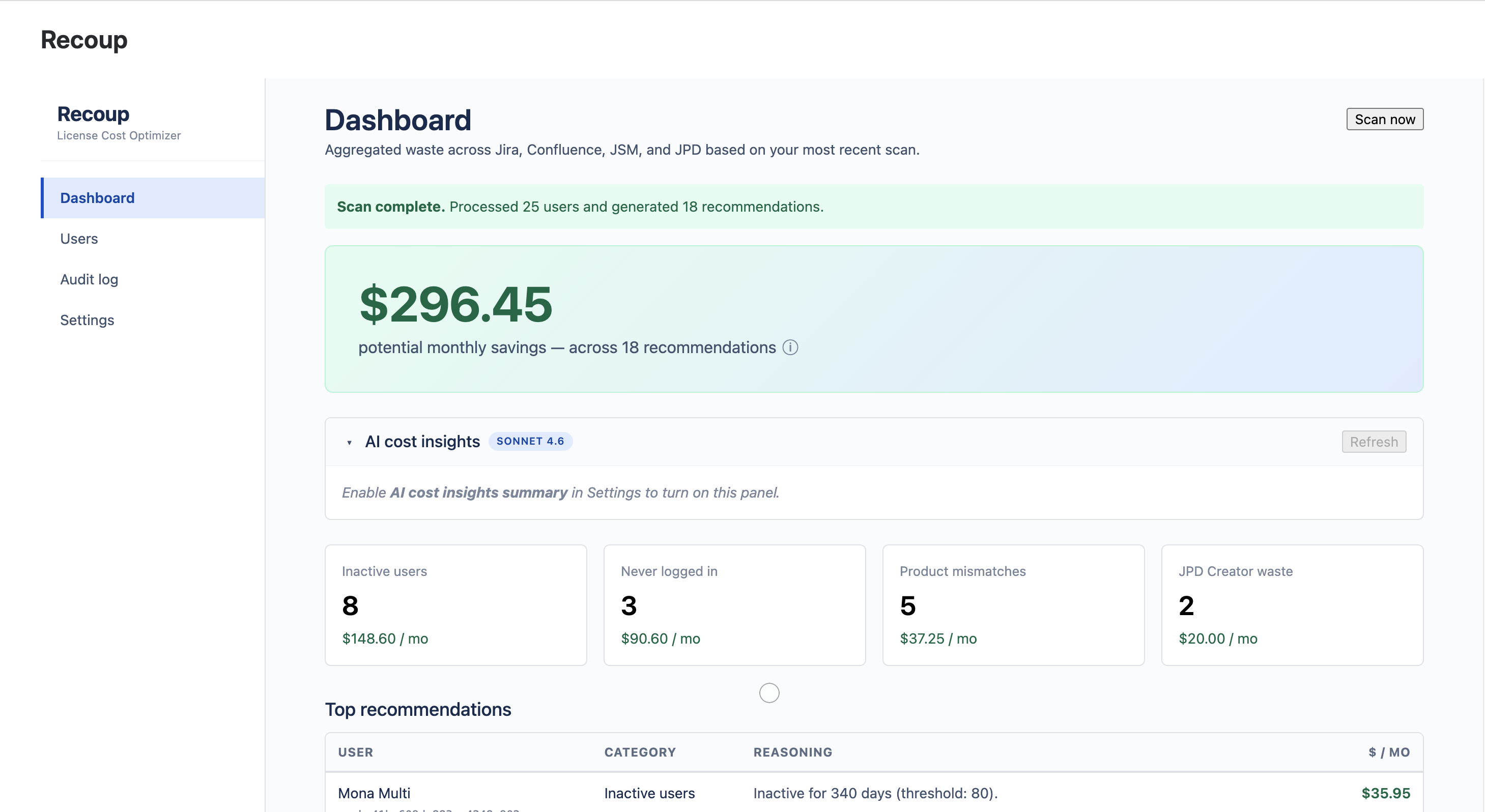
Recoup dashboard headlining total monthly savings broken into four waste categories
DASHBOARD — the first surface after install

One dashboard. One number finance understands.

Recoup unifies Jira, Confluence, JSM and JPD into a single dollar-denominated view. No more "X inactive users" — instead "$1,247 / month reclaimable, here's where." Click any waste category to drill into the exact users behind it.

  • Cross-product scan — ~100 users / second
  • Three detectors: inactive, product mismatch, JPD Creator
  • Recommendations ranked by dollar impact
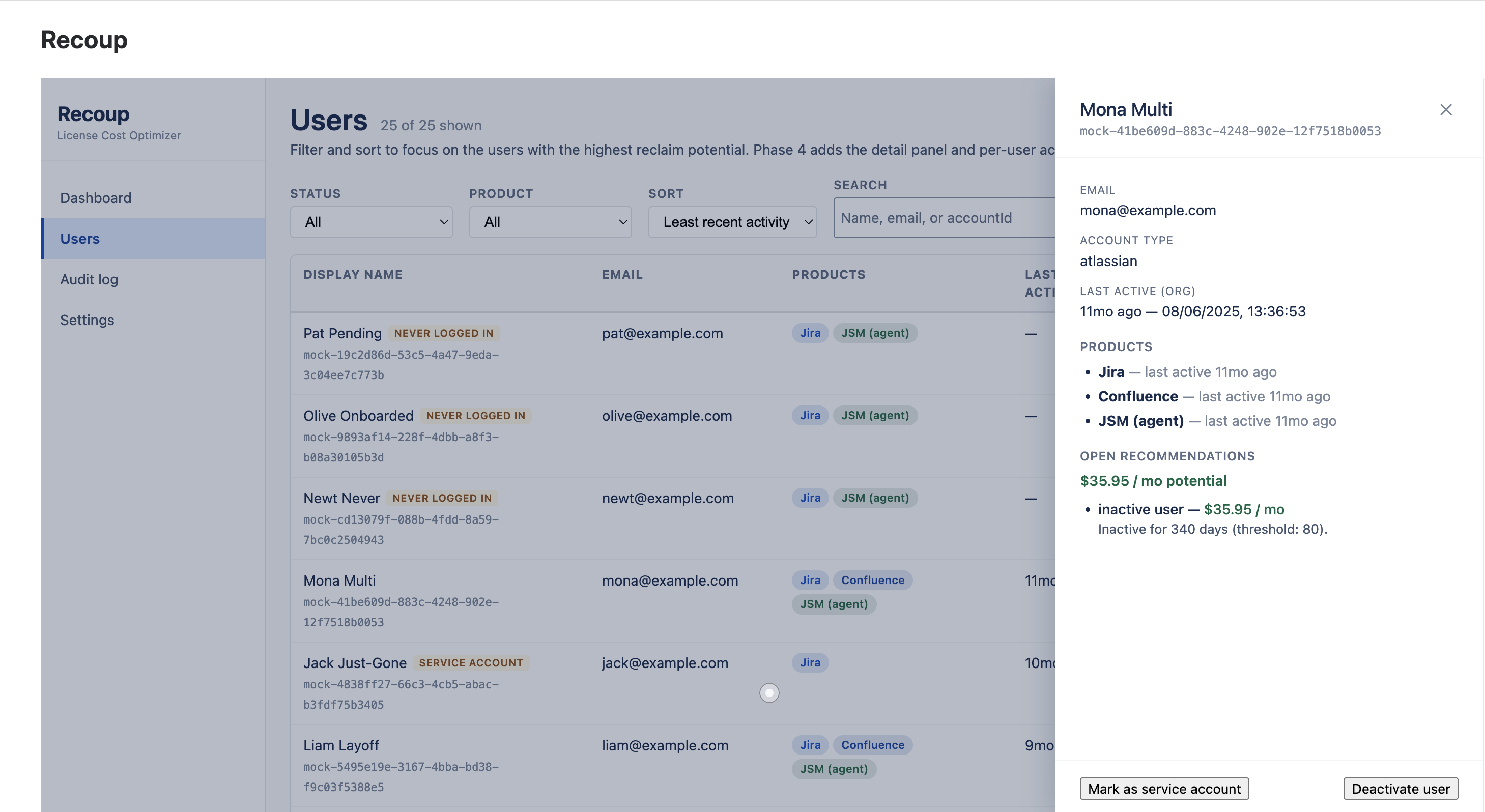
Recoup user detail panel showing per-product activity and a reversible reclaim recommendation
USER DETAIL — drill in, decide, document

Reversible by design — never destructive.

Reclaiming a seat removes the user from the Jira/JSM access group you mapped — Atlassian stops billing them, and one-click Add back undoes it instantly. Recoup never deletes, suspends or hard-deactivates accounts. Identity and SSO stay untouched.

  • Per-product activity timeline per user
  • Every recommendation in plain language, in dollars
  • Reclaim requires a typed reason — recorded in the log
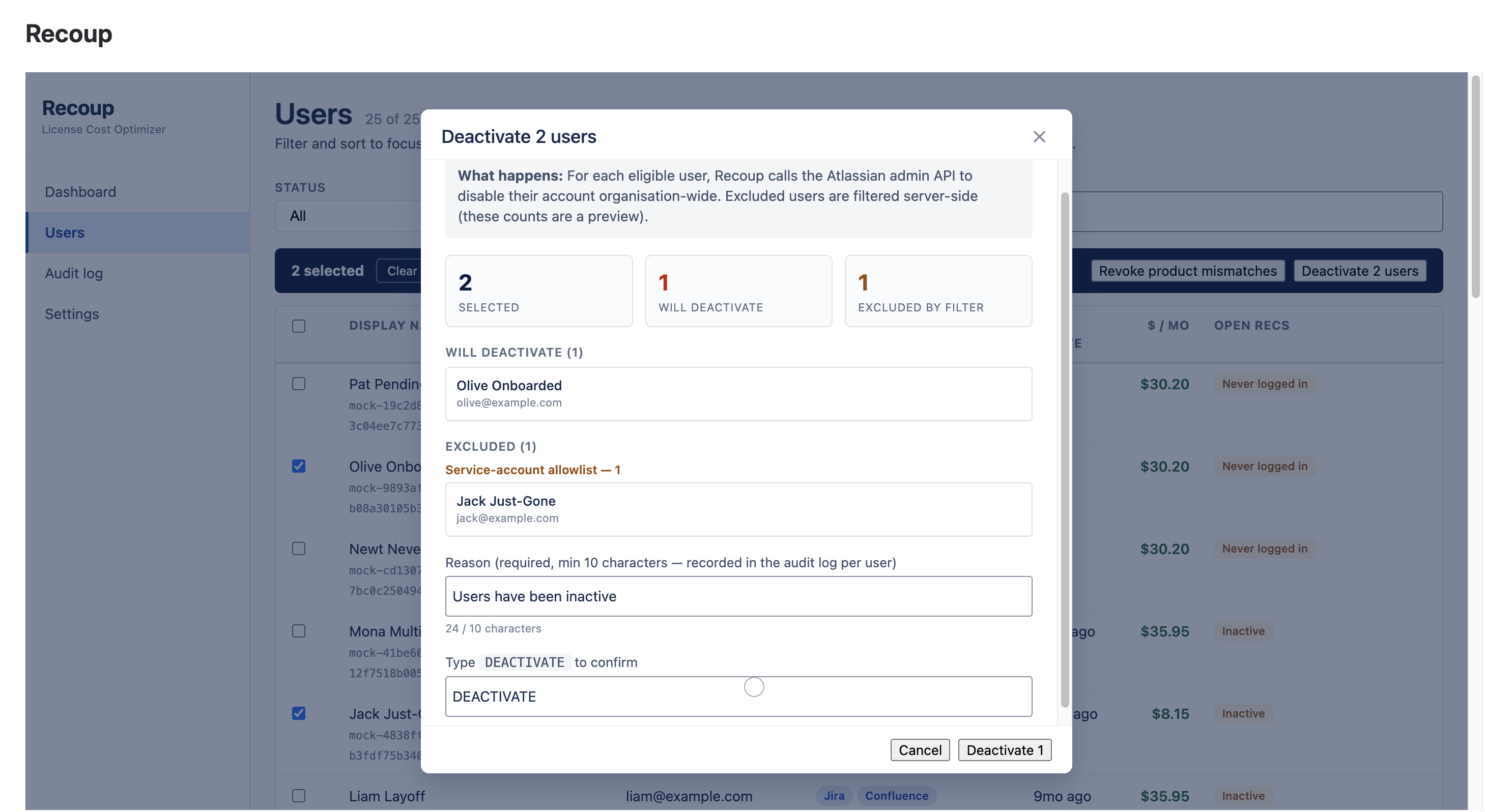
Recoup bulk reclaim modal with eligible users and excluded service accounts grouped by reason
BULK RECLAIM — safety rails before you confirm

The #1 cleanup mistake — solved.

Reclaim up to 50 seats at once. Recoup flags likely service, bot and integration accounts with deterministic rules and excludes them server-side — alongside org admins and your own account. The modal shows you exactly who's excluded, and why, before you click.

  • Rule-based service-account detection
  • Server-enforced exclusions — not just client-side
  • Typed REMOVE confirmation gates every bulk action
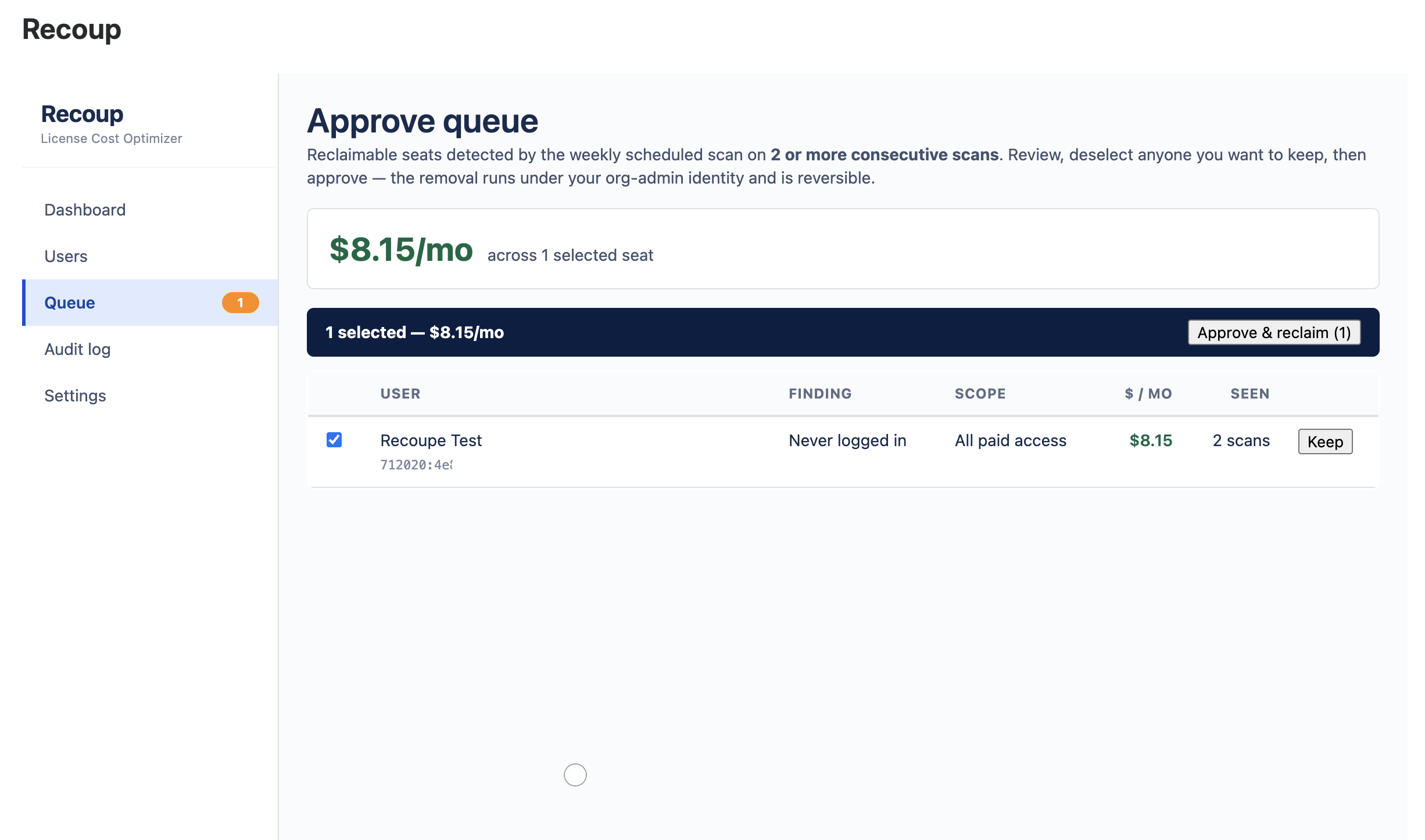
Recoup approve queue — seats confirmed as waste on two consecutive scans, one click to reclaim
APPROVE QUEUE — waste finds itself, you hold the button

Waste finds itself. You still approve it.

A scheduled scan re-audits every seat each week, read-only. A seat reaches the queue only after it's flagged on two consecutive scans — never a one-off blip. Review the list, keep anyone with one click, clear the rest with one more. Nothing is ever removed without a human.

  • Weekly scheduled detection, fully automatic
  • No autonomous removal path exists — by design
  • Same rails: reversible, audited, service-accounts safe
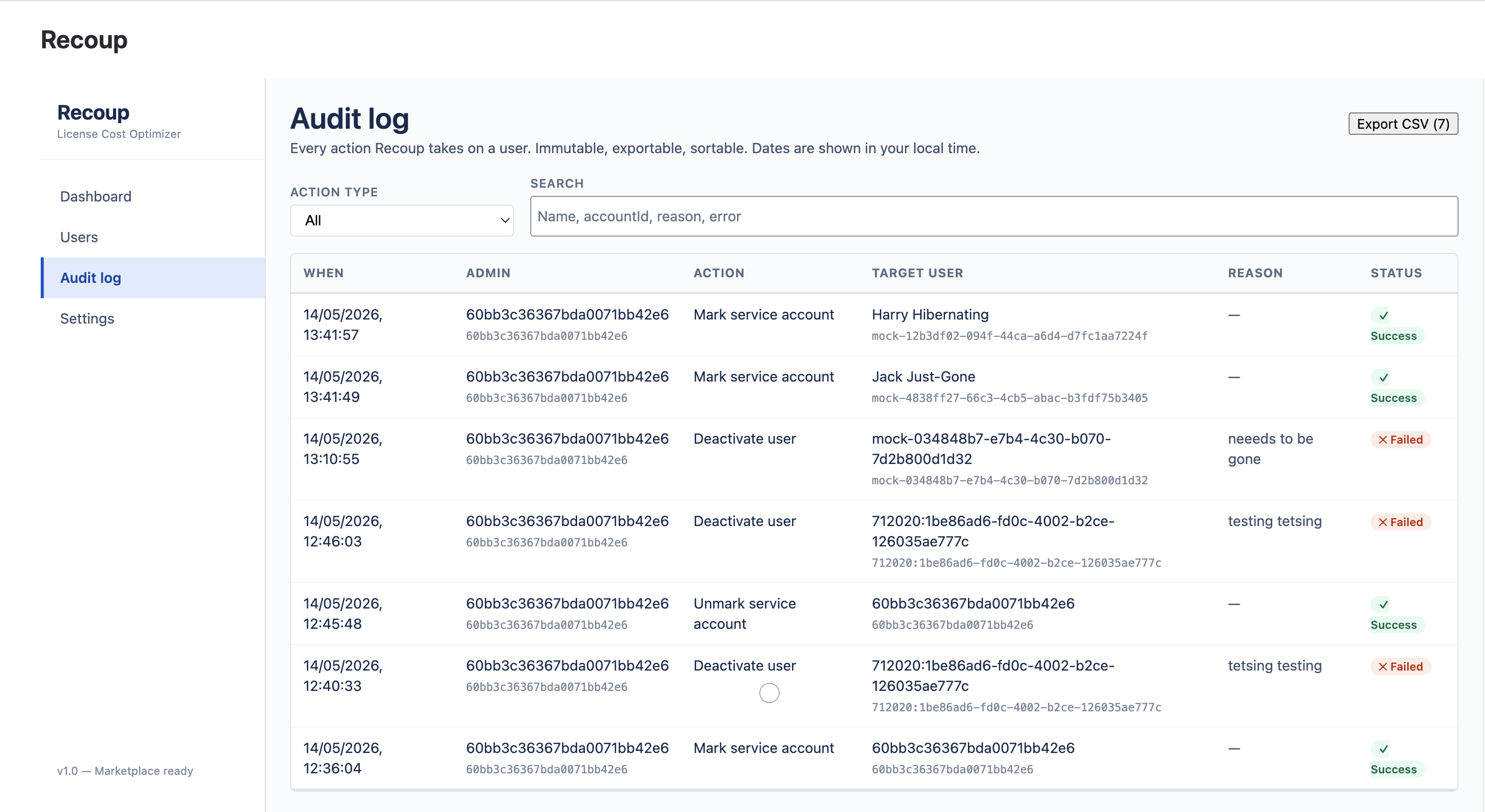
Recoup audit log with successful and refused actions, exportable as CSV
AUDIT LOG — immutable, exportable, finance-ready

The security review writes itself.

Every action a Recoup admin takes is recorded with a full before/after diff — successes and refusals alike. Each row carries the required reason written by the admin who acted. Export to CSV, formatted for FP&A and security reviews.

  • Immutable audit trail, every attempt
  • CSV export with the columns finance needs
  • Zero data egress — all of it inside Forge
Recoup · pricing

One price. Pays for itself on the first scan.

Most customers reclaim many times the subscription cost in the very first scan. 30-day free trial, no credit card, cancel any time.

Recoup · Standard
$1.50
per Atlassian user · per month · USD
  • Cross-product scan engine
  • Inactive · Mismatch · JPD detectors
  • Rule-based service-account guard
  • Reversible bulk seat reclaim (up to 50)
  • Scheduled detection + approve queue
  • Immutable audit log + CSV export
  • Forge-hosted, encrypted at rest
Get Recoup on the Marketplace Need enterprise pricing?

Atlassian volume discounts apply automatically — ~20% off at 100+ seats, ~35% at 500+. For 5,000+ seats or annual prepay, talk to us.

Word Count for Confluence
The problem

Confluence still has no word count.

Writers, translators and content teams need it constantly — for quotes, for limits, for sign-off. So they copy the whole page into some random web counter, wait, and copy it back. Every time. On internal documentation that should never leave the building.

Word Count puts the number where it belongs: in the page byline, the moment the page loads.

The solution

Always visible. Stores nothing.

A live count for every page, plus a full breakdown one click away — computed on Atlassian's Forge platform from the page you're already viewing.

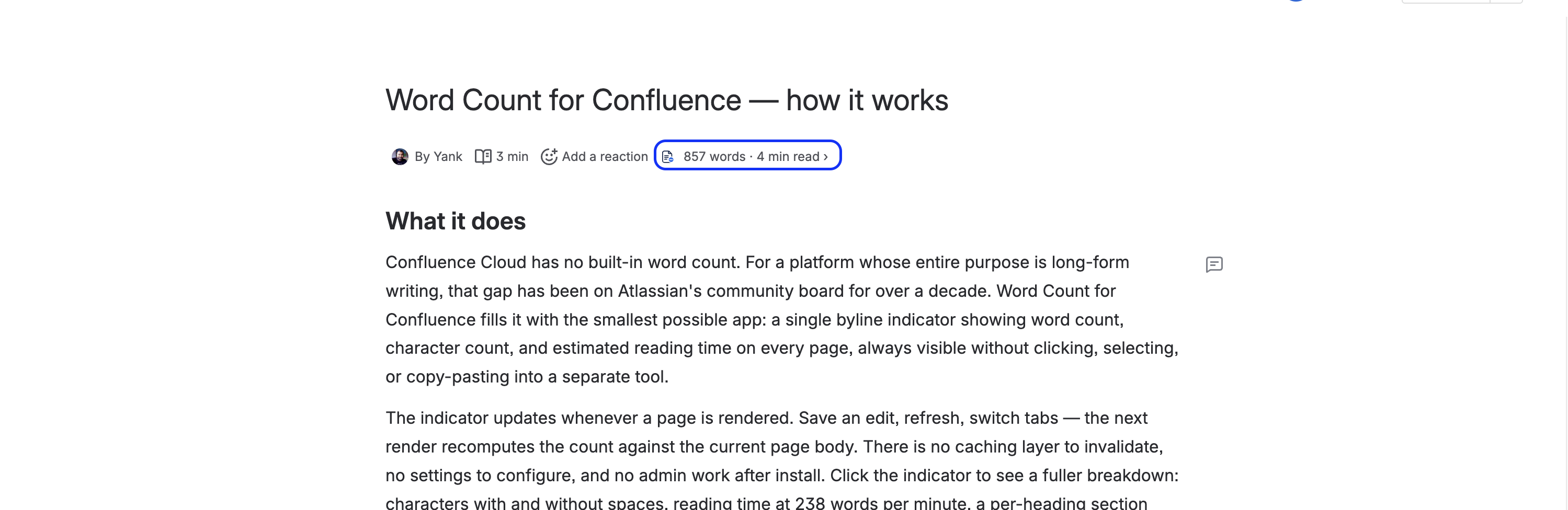
Word count, character count and reading time shown live in a Confluence page byline
THE BYLINE — count is there the moment the page loads

Live in every byline.

Word count, character count and reading time sit right next to the avatar and timestamp at the top of every page — no clicking, no highlighting, no copy-pasting into another tool. The count refreshes every time the page renders.

  • Words, characters and reading time, always on
  • Reading time at 238 wpm — the adult-reading average
  • Works on every Confluence page, automatically
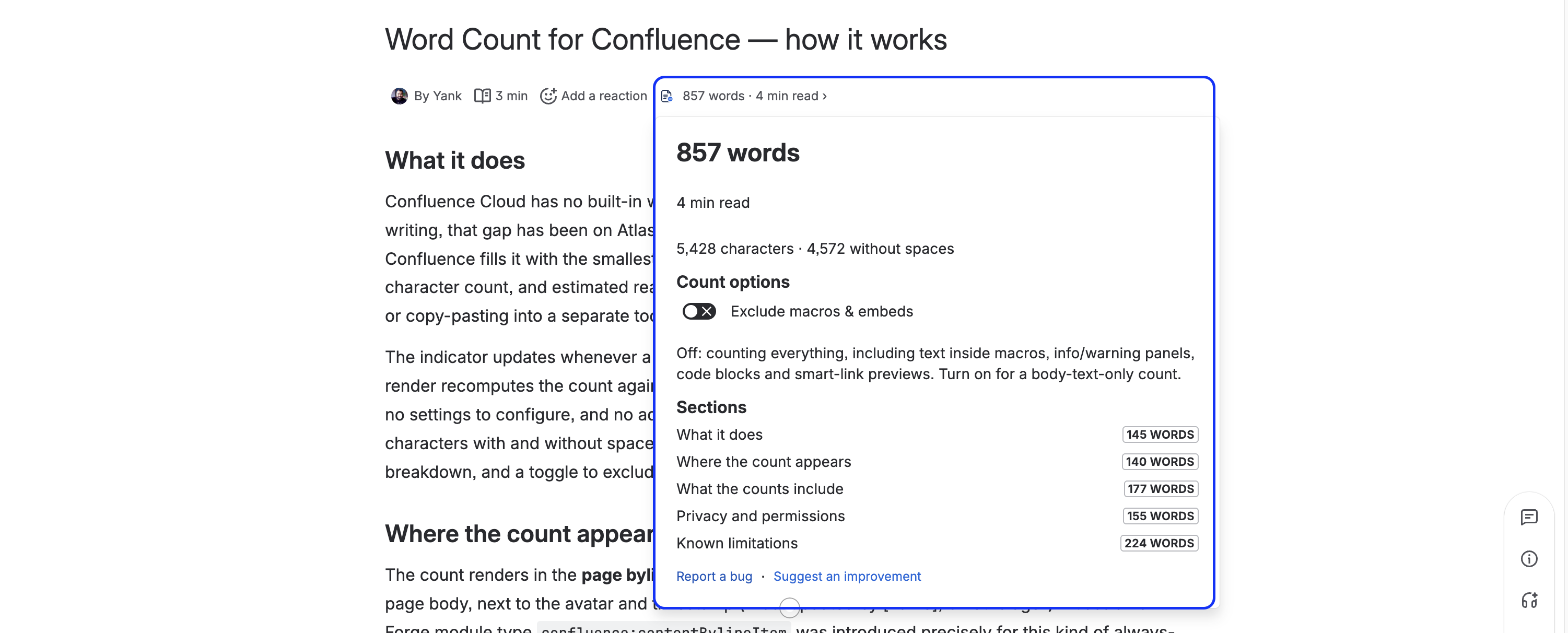
Word Count expanded panel showing words, characters with and without spaces, and reading time
EXPANDED PANEL — the full breakdown on click

The full breakdown, one click away.

Click the byline for words and characters — with and without spaces — and estimated reading time, laid out clearly. Everything a writer or translator needs to quote, scope or sign off a page.

  • Characters with and without spaces
  • Clean, readable panel — no clutter
  • Report-a-bug / suggest links built into the footer
Word Count per-heading section breakdown with word-count lozenges
SECTIONS — a per-heading word-count breakdown

See the weight of every section.

A per-heading breakdown shows the word count for each section of the page — so you can spot the bloated parts, balance a doc, or quote on a single section without doing the maths yourself.

  • One row per heading, with a word-count lozenge
  • Find the heavy sections at a glance
  • Great for long docs and structured runbooks
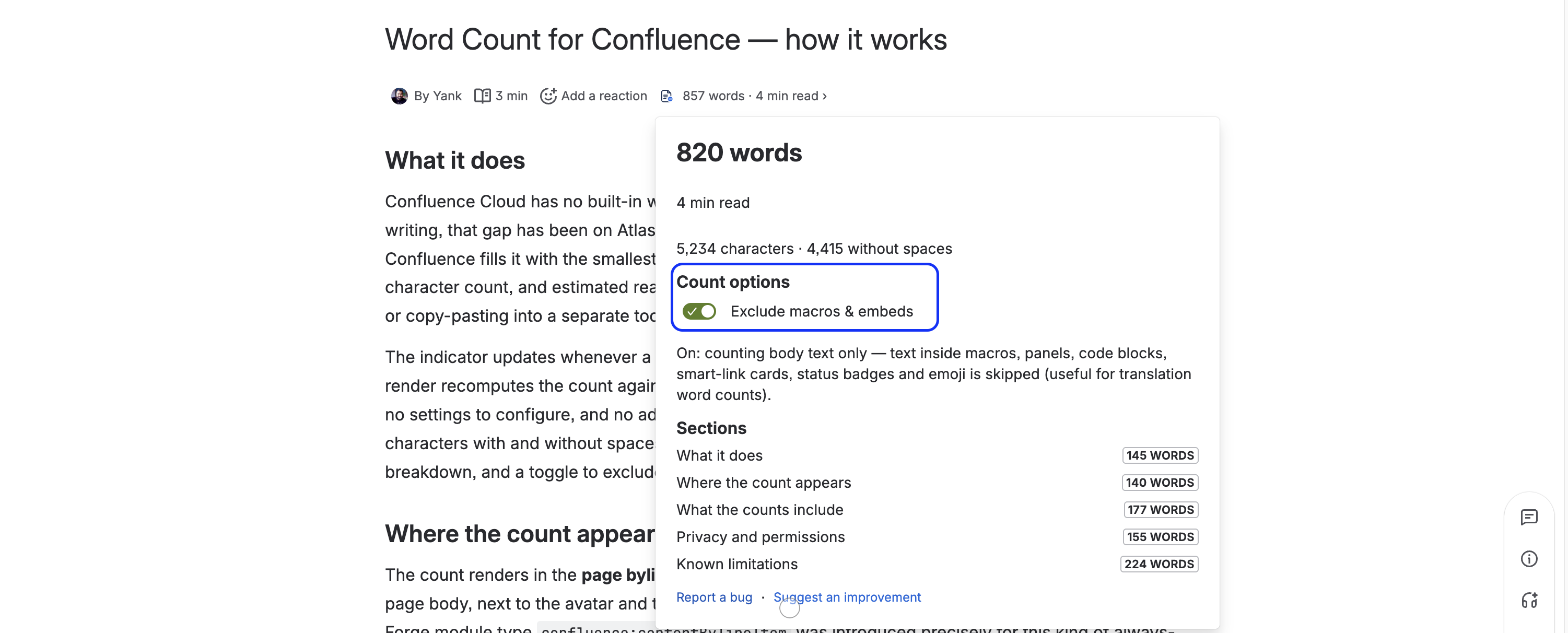
Word Count exclude-macros toggle for a body-only count
EXCLUDE MACROS — a translator-friendly body-only count

Body-only count — and privacy as a feature.

A one-tap toggle excludes macros and embeds — code blocks, panels, smart links, status badges — for a clean body-text count translators can quote on. And the whole app stores nothing and sends nothing: no database, no analytics, no third-party calls.

  • Exclude macros & embeds with one tap
  • Two read-only scopes, both pinned in the manifest
  • Zero storage, zero egress — one of the safest apps you can add
Install Word Count — free Free forever · zero storage · two read-only scopes
Issue Templates for Jira
The problem

Every team retypes the same work items.

Bug reports, release checklists, onboarding epics — the same fields and the same sub-task breakdown, typed out by hand every single time, and slightly differently in every project.

Issue Templates prefills the Jira Create screen the instant you pick a template — fields, labels, description, and a whole hierarchy of child work items, from Epic → Story → Subtask to any custom hierarchy like Initiative → Feature → Epic → Story — across one project or every project at once. Works on Jira Software, Jira Work Management, and Jira Service Management.

Apply Template ★ Bug report
Summary[Bug] prefilled ✓
Labelsbug · triage ✓
ChildrenInvestigate · Fix · Verify ✓
picked once — fields fill live, sub-tasks created on submit
The solution

Pick once. The form fills itself.

Author a template once, then apply it right on the Jira Create screen — fields, labels, description and a whole work-item tree — computed on Atlassian's Forge platform, with nothing leaving your tenancy.

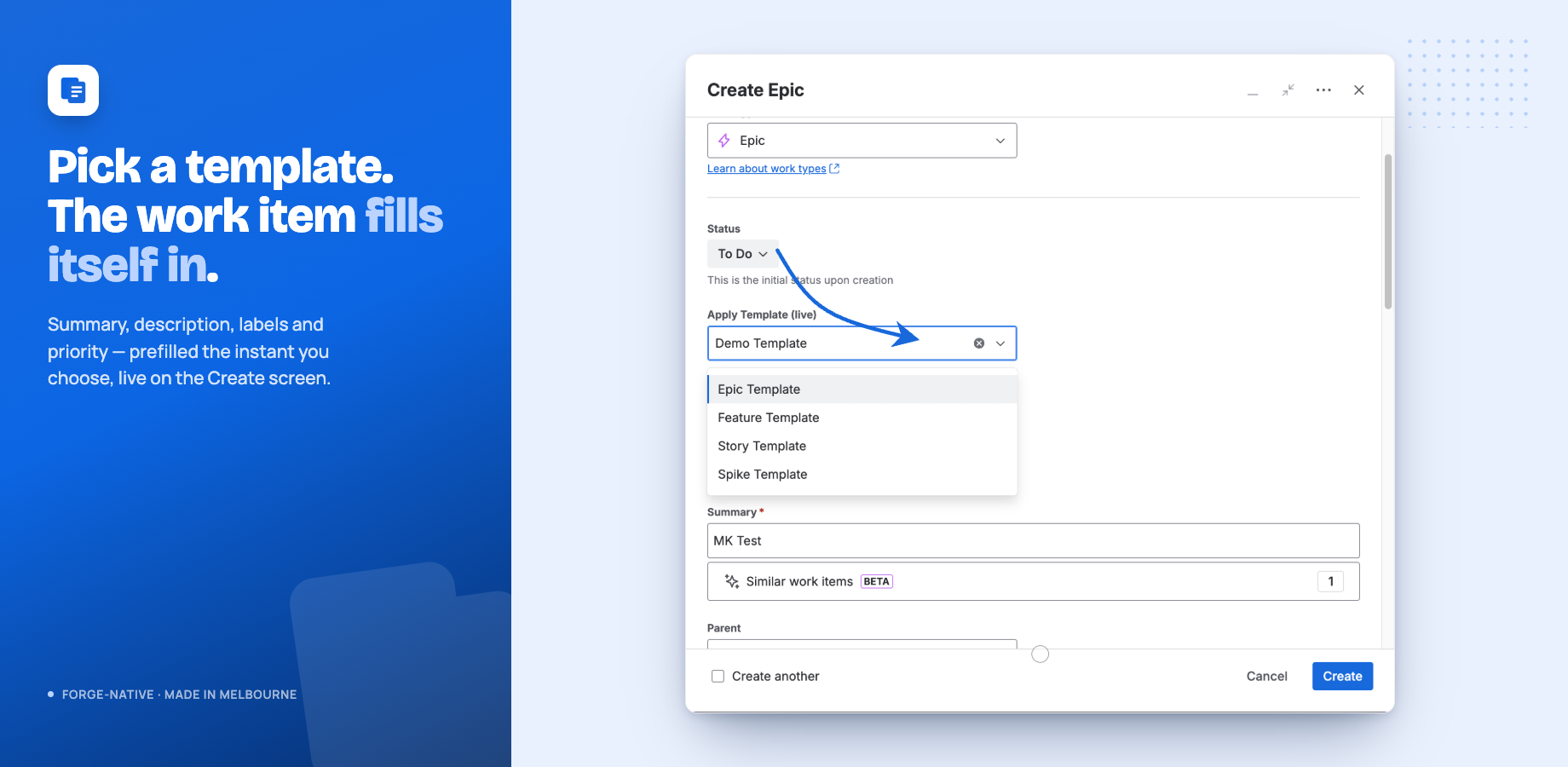
The Apply Template field on the Jira Create screen, with summary, description and labels filled in live
THE CREATE SCREEN — pick a template, fields fill live

Instant prefill, right where you create.

Choose a template in the Apply Template field and the work item fills itself in the instant you pick it — summary, description, labels and priority. No retyping, no copy-pasting the same structure into every new issue.

  • Fields prefill live, before you submit
  • Set a default template per project and work type
  • Built to load near-instantly — never slows Create down
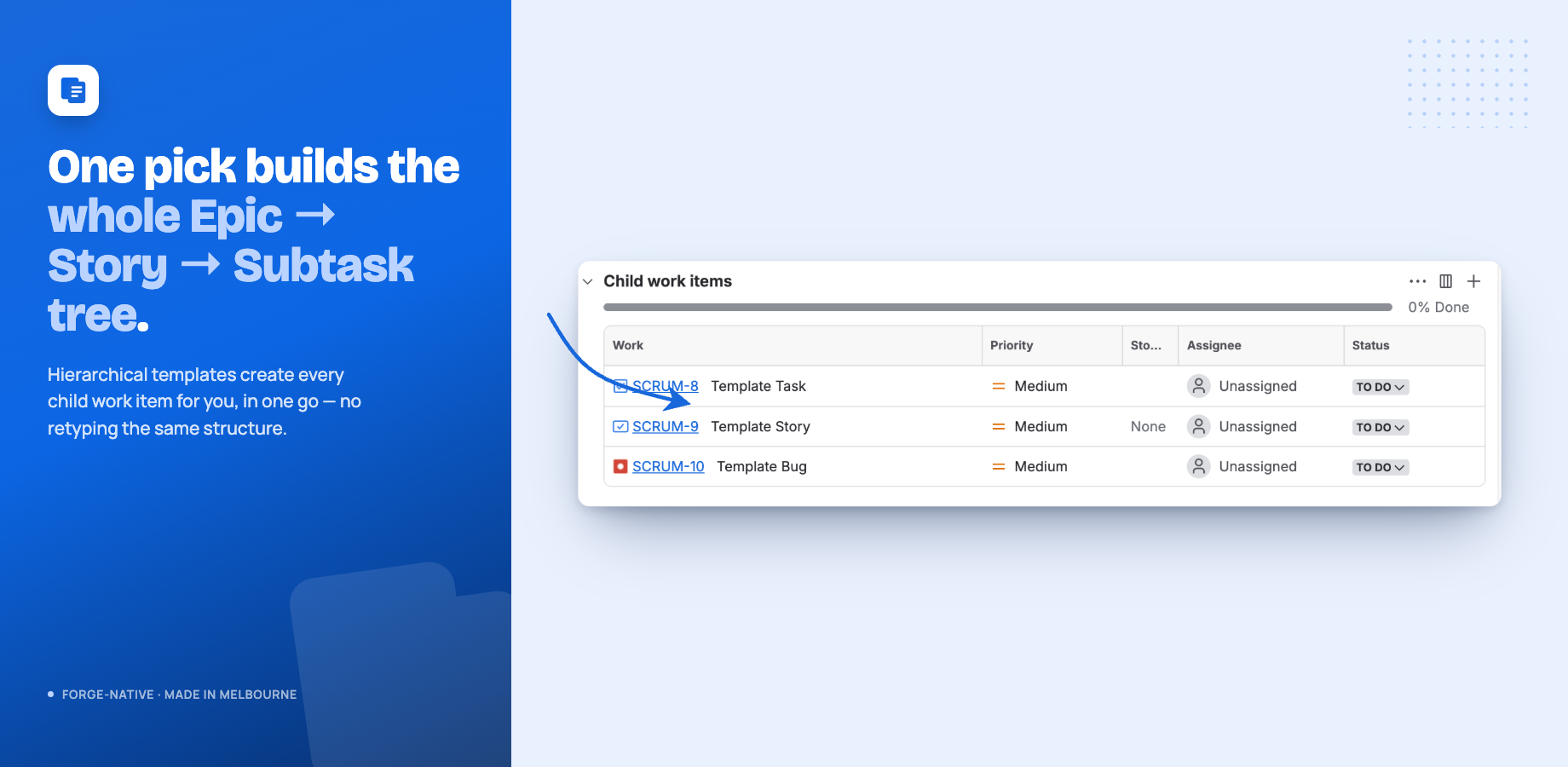
A full Epic to Story to Subtask tree created automatically from a single template pick
HIERARCHIES — a whole Epic → Story → Subtask or custom tree in one pick

Whole hierarchies — including custom ones.

Hierarchical templates create every child work item for you — a full Epic → Story → Subtask tree, or a custom Jira Premium hierarchy like Initiative → Feature → Epic → Story, from a single pick, named and parented automatically. Repeatable processes get created the same correct way every time.

  • Epic → Story → Subtask or any custom Premium hierarchy
  • Every level carries its own content and smart values
  • Children named and parented for you, no manual entry
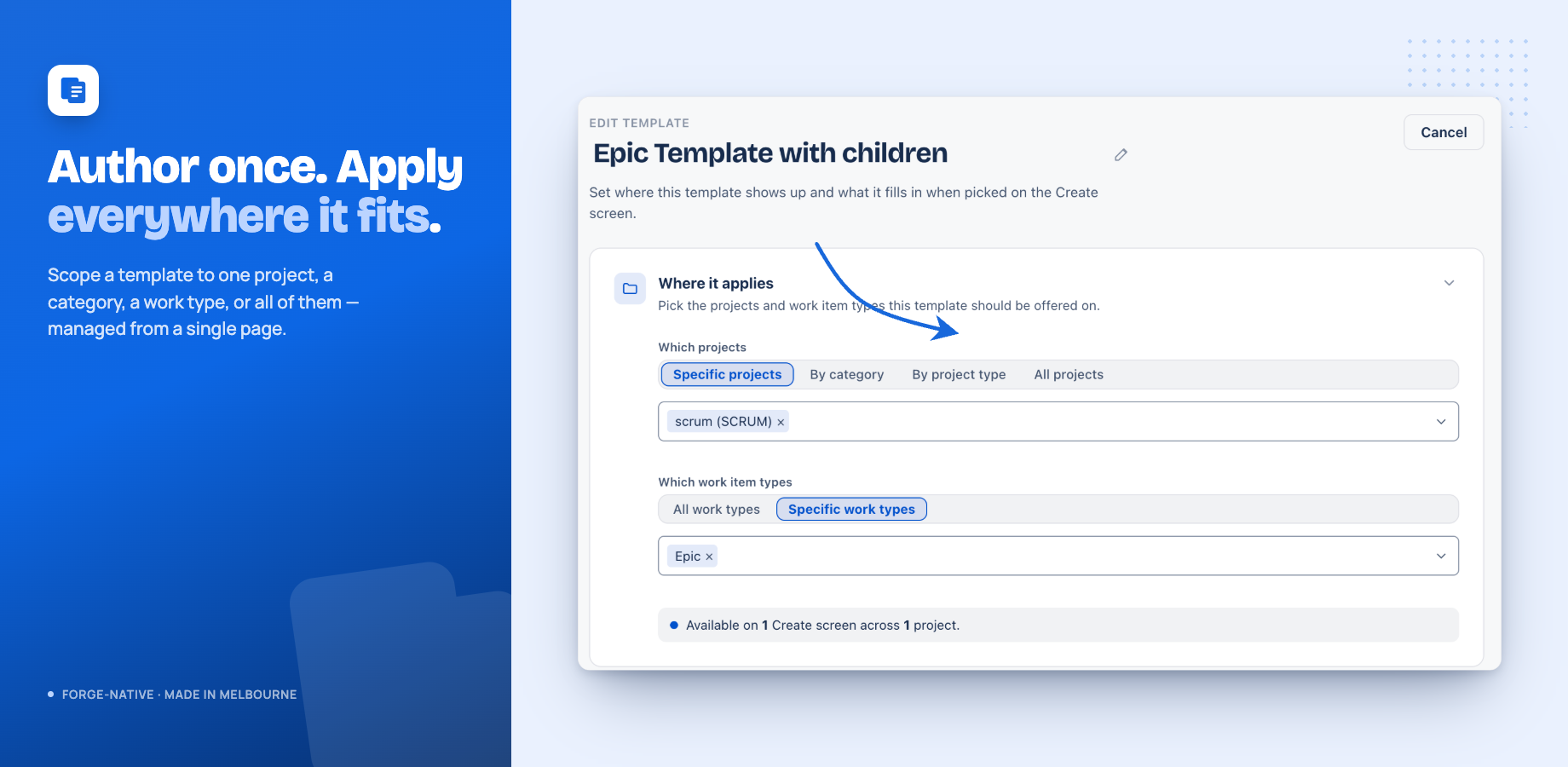
The authoring page choosing where a template applies — specific projects, a category, a project type, or all projects
SCOPE — one project, a category, a type, or all

Scope it once, apply it everywhere.

Author a template once and scope it to a single project, a category, a work type, or every project at once — managed from one authoring page. New projects that match a broad scope are picked up automatically.

  • Specific projects, a category, a project type, or all
  • Works on Jira Software, Work Management and Service Management
  • Admin-only authoring, verified on every action
{ }

Smart values

Templates resolve context as they apply — {{today}}, {{now+7d}}, {{parent.key}}, {{epic.summary}}, {{currentUser.name}} and more.

Existing items too

Apply a template to any existing work item — empty fields fill in (overwrite is opt-in) and the child tree is created underneath.

Import, export & examples

Back up templates to JSON and restore with a dry-run preview, or start from a curated examples gallery in one click.

🔐

Granular permissions

Manage, Delete-any and Import/Export roles for groups or people. Jira admins always keep full access.

Install Issue Templates Free for up to 10 users · company-managed · zero external egress · full documentation
Hooks — TypeScript automation for Jira
The problem

Jira scripting is a black box.

Automation works — until it silently stops, or throws at 3 a.m. with no logs, no line numbers, no way to replay what happened, and no way back to the version that worked. The whole scripting category has shipped that experience for a decade.

Hooks is the ScriptRunner alternative built the other way round: every run — manual, event-triggered, scheduled, or bulk — records its logs, timing, returned value, and errors mapped to the exact line of your TypeScript. Every save is versioned. Every mistake is one click from undone.

Hook escalate-stale-bugs
TriggeronSchedule · weekdays 09:00 ✓
RunOK · 412 ms · 7 log lines ✓
Versionv14 — roll back in one click ✓
every run recorded and replayable — automation that never fails silently
The solution · in development

Automation you can actually see.

Write TypeScript — not Groovy, not a proprietary DSL — and run it from a console, on ten kinds of work-item events scoped to exactly the projects and types you pick, on schedules described in plain words, or as background bulk jobs over a JQL. Rehearse with dry-run before anything touches Jira. Built on Forge with zero external egress, so your scripts never leave Atlassian's infrastructure.

Explore Hooks In development · TypeScript · every run replayable · one-click rollback · compare with ScriptRunner
Bespoke Charts & Reports for Confluence and Jira
The problem

Jira reporting in Confluence is a stale screenshot.

Every sprint review, someone screenshots a Jira dashboard, pastes it on a page, and by Thursday it's wrong. The people reading the page can't drill in, can't trust the numbers, and can't see what changed.

Bespoke puts a live chart on the page instead — built from a project, a saved filter, or any JQL search, rendered fresh from Jira every time the page loads, filtered to what each viewer is allowed to see.

42 work items live from Jira · refreshed on every view
The solution

Charts that are never stale.

Pie, donut, bar, stacked bar or a KPI tile — from a project, saved filter, project type, category, or a JQL search with Jira-grade autocomplete. Every viewer sees only the work items their Jira permissions allow.

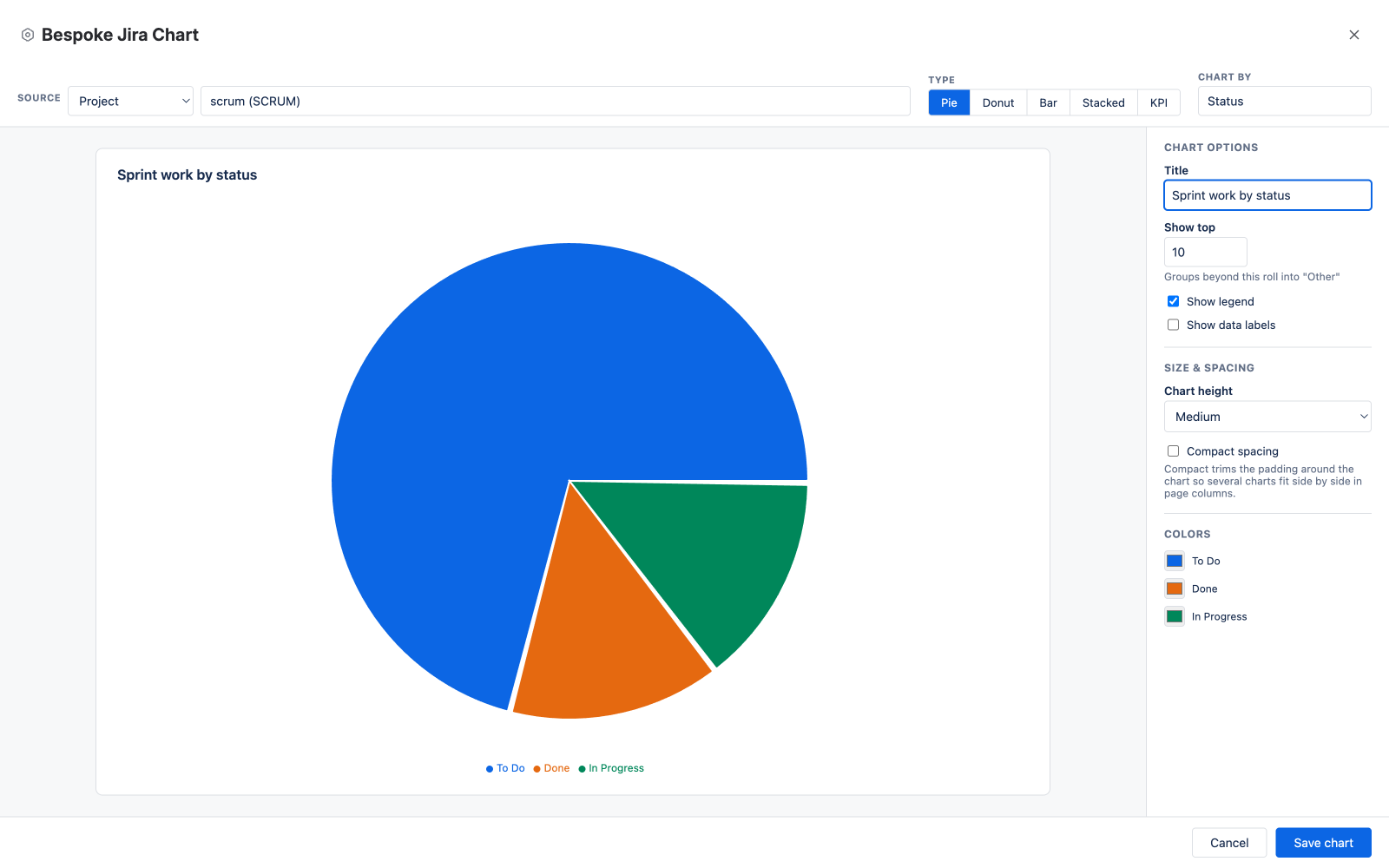
Bespoke fullscreen chart editor with a live pie chart preview, source toolbar and options rail
THE EDITOR — fullscreen, with a live preview as you build

Build it in a minute. Watch it update live.

The editor opens fullscreen the moment you insert the macro. Pick a source — searchable project and filter pickers, or JQL that autocompletes fields, operators and live values like Jira's own search — choose a chart type, and the preview renders real data as you go.

  • Five sources: project, saved filter, JQL, project type, category
  • Chart by any field, including custom fields
  • Per-segment colors, top-N grouping, legend and label toggles
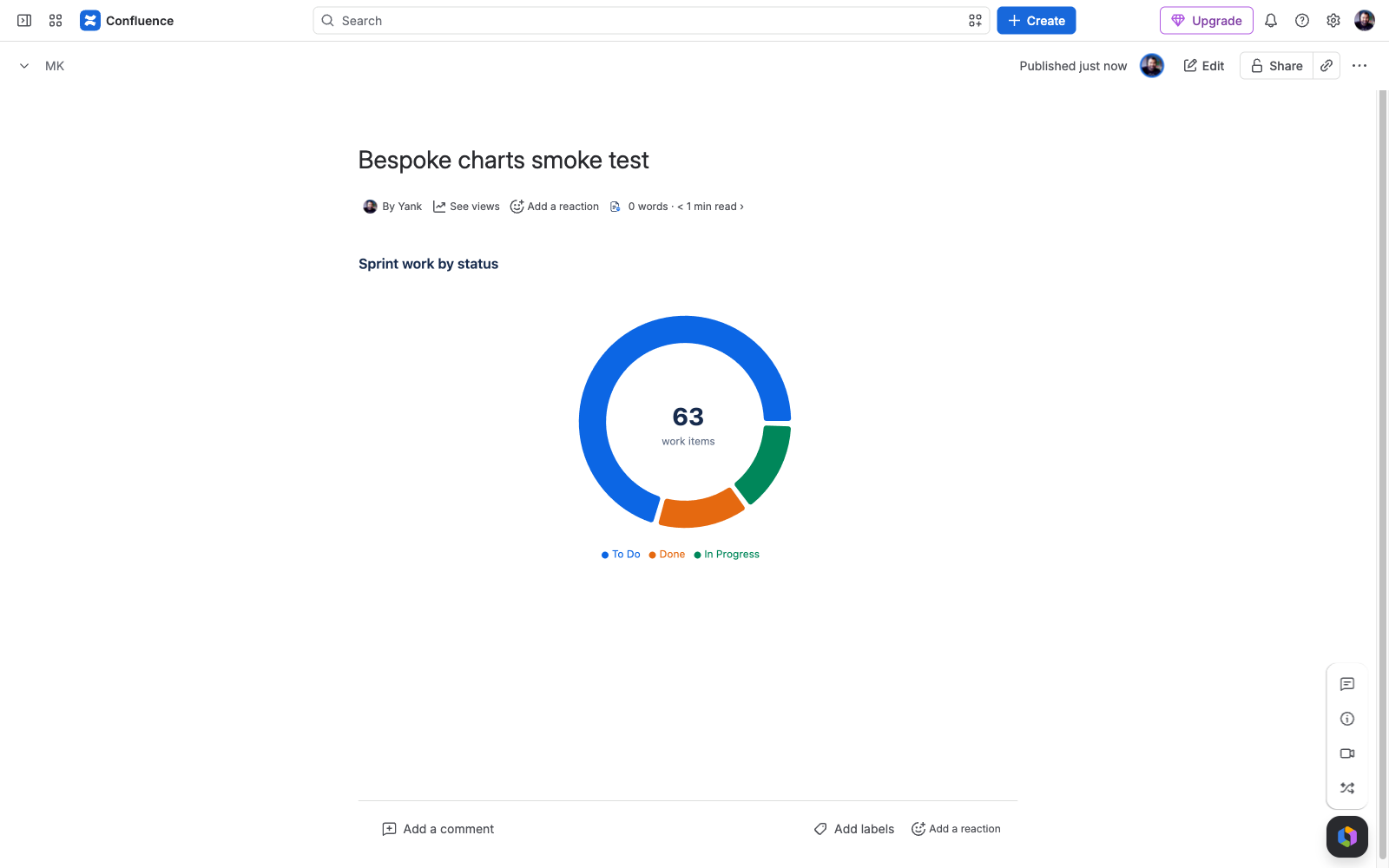
A published Confluence page showing a live donut chart of Jira work items with a center total
ON THE PAGE — live data, viewer-correct, zero storage

Right on the page. Right for every reader.

The chart lives in the page and refreshes from Jira on every view. Each reader sees a chart computed from their own Jira permissions — nothing is published that they couldn't already see, and the app stores nothing at all.

  • Every viewer gets a permission-correct chart
  • Size and compact-spacing controls tile charts in page columns
  • Free for teams up to 10 · 30-day trial
Explore Bespoke Marketplace submission in review · Confluence Cloud · zero storage, zero egress
Sift — Table Filters, Pivots & Charts for Confluence
The problem

Confluence tables are where reporting goes to stall.

You can make a table in Confluence — but you can't filter it, total it, or chart it. So the data gets exported to a spreadsheet, summarised there, and pasted back as a screenshot that's stale by Thursday. The incumbent fix means wrapping your table in three nested macros.

Sift does the whole thing in one macro: pick a table on the page (it stays live), an attached CSV/TSV/JSON file, or pasted data — add saved filters, pivot it, and show an interactive table, a chart, or both.

source → filters → pivot → chart · one macro
The solution

One macro, table to finished report.

Source → saved filters → optional pivot → display. Text, pick-list, number-range, and date-range filters; Sum, Count, Count distinct, Average, Min, Max, or Median pivots with totals; column, bar, stacked bar, line, area, pie, donut, or KPI-card charts. Up to 10,000 rows.

Point it at data you already have.

Any table already on the page stays a live source — edit the table and the report updates on the next view. Or attach a CSV, TSV, or JSON file up to 4 MB, or paste a small dataset straight into the macro. No exporting to a spreadsheet, no nesting macros inside macros.

  • Three sources: a table on the page (live), an attached file, or pasted data
  • Saved filters: text, pick-lists, number ranges, date ranges, global search
  • Pivot by any column, split by another, with totals

Readers explore. Nobody needs edit rights.

On the published page, every reader can sort columns, filter, search, page through rows, and export CSV — without touching the macro. Data is read with each viewer's own permissions, processed in memory, and never stored or sent anywhere.

  • Reader-side sort, filter, search, pagination, and CSV export
  • Viewer-permission reads — nobody sees content they couldn't open
  • Zero app storage, zero external egress · free for teams up to 10
Install Sift Free for up to 10 users · 30-day trial · Confluence Cloud · zero storage, zero egress · explore Sift
HTML for Confluence Pages
The problem

Custom HTML in Confluence means a bare textarea and a leap of faith.

The legacy HTML macros were built for Confluence Server: paste code into an unstyled box, save, and hope. Safety is an admin allowlist bolted on the side, and the market leader's include-from-URL design ships your content through external infrastructure — then doubled its price.

HTML for Confluence Pages is cloud-first: a syntax-highlighted editor with a live preview, DOMPurify sanitization with three profiles, site-wide admin guardrails, and a sealed double sandbox — running entirely on Atlassian.

write → preview → sanitized, sandboxed render · on Atlassian
The solution

A real editor in front, a sealed sandbox behind.

HTML, CSS and JS tabs with syntax highlighting and a live preview through the exact published pipeline. Strict, Standard, or Trusted sanitization per block; a JavaScript kill-switch and profile ceiling for admins; attached-file rendering up to 10 MB.

Write it like code, because it is.

Each language gets its own tab — highlighting, line numbers, bracket matching, undo history — with a live preview beside it that renders through the same sanitize-and-sandbox pipeline as the published page. When sanitization removes something, a banner says exactly what.

  • Syntax-highlighted HTML/CSS/JS editor with live preview
  • Render an attached .html file, restyled by the block's CSS and JS
  • Auto-height or fixed height; 100 KB of code per block

Containment is the architecture.

Author code runs on a null origin inside a sandboxed frame within the app's own isolated frame — no access to Confluence data, cookies, or anything beyond its block. Admins hold a site-wide JavaScript kill-switch and a maximum-profile ceiling authors can't exceed.

  • DOMPurify sanitization: Strict / Standard / Trusted, per block
  • Admin guardrails in Confluence administration
  • Zero storage of page content, zero external egress · free for teams up to 10
Install HTML for Confluence Pages Free for up to 10 users · 30-day trial · Confluence Cloud · runs entirely on Atlassian · explore the app
Showdown — Planning Poker for Jira
The problem

Estimating shouldn't mean a second app, a shared room link, and copy-pasting numbers back into Jira.

Planning poker usually lives in a separate web tool — its own room links, its own logins, its own servers — or a paid app that runs your sprint data through external infrastructure. Either way the team estimates in one place and then someone re-keys the agreed number into each work item by hand.

Showdown runs the whole session inside Jira, on your real work items, and writes the agreed estimate straight to the field. Pure Forge, zero external egress, Runs on Atlassian — the votes and the numbers never leave your site.

? ? 8 8 vote → reveal → agreed estimate saved to Story Points · on Atlassian
The solution

The whole session, inside Jira.

Pull a sprint or a JQL search of up to 50 work items into a room, estimate them together, and the agreed number saves straight to a field. Three ways to run it, hidden votes until the reveal, and nothing ever leaves your site.

Three ways to estimate.

Run an interactive live room where the team votes at once and the facilitator reveals hidden votes in one click — with a discussion timer, auto-reveal, and spectator mode. Or open async voting so people estimate on their own schedule across time zones. Or size a backlog fast by dragging work items into buckets on a shared board.

  • Interactive, async, and bucket-sizing modes
  • Hidden votes; reveal shows average, median, agreement and a suggested final
  • Scales for every team: Fibonacci, T-shirt, powers of two, 1–10, or custom

Straight into Jira.

Pick a sprint or write a JQL search — up to 50 work items per session. When the team agrees, the number saves to any Jira number field, Story Points first, written as the facilitator so your project's permissions always apply. Reference work items anchor the scale so everyone estimates against the same yardstick.

  • Sprint quick-pick or JQL selection, up to 50 work items
  • Agreed estimate saved to Story Points or any number field
  • Reference work items as shared anchors for each scale value

Runs on Atlassian.

Showdown is pure Forge with zero external egress — every vote, every session, every saved estimate stays inside your Atlassian tenancy. Votes are hidden from everyone until the facilitator reveals or the async round closes, so no one anchors on someone else's number.

  • Pure Forge, zero external egress — votes never leave your site
  • Votes stay hidden until reveal — no anchoring
  • Facilitator-only reveal, navigate, finals and save
Explore Showdown Coming soon to the Atlassian Marketplace · Jira Cloud · runs entirely on Atlassian
What every Taskhooker app shares

Built like an accountant would.

Same principles across the whole portfolio. Hosted by Atlassian Forge, nothing leaves your tenancy, nothing destructive, every output you can defend in a review.

§

Forge-native

All processing happens inside Atlassian's runtime. No third-party servers, no AI vendor, no shadow IT, no data leaving your region.

$

Dollars in every output

If a recommendation can't be priced, it doesn't ship. Admins and finance see savings, not abstract counts.

Reversible by design

Every action an app takes is one click from undo. Nothing auto-deactivates, nothing is destroyed.

Zero egress

Minimal, transparent scopes and no outbound calls beyond Atlassian's own APIs. The security review writes itself.

FAQ

Questions about Taskhooker.

More questions? Email support@taskhooker.com — answers usually within a few hours.

What does Taskhooker make? +

Taskhooker builds Forge-native apps for the Atlassian Marketplace. There are six: Recoup (finds and reclaims wasted Atlassian licenses across Jira, Confluence, JSM, and JPD, in dollars), Word Count for Confluence (live word count and reading time in every page byline), Issue Templates (reusable Jira templates that prefill the Create screen with smart values, create full Epic → Story → Subtask trees, and apply to new or existing work items), Hooks (observable, version-controlled TypeScript automation for Jira — a ScriptRunner alternative, in development), Bespoke (charts live Jira data on a Confluence page from a JQL search or saved filter, with viewer-permission data access; Marketplace submission pending), Sift (filters, pivots, and charts any table, attached data file, or pasted data on a Confluence page in one macro; live on the Atlassian Marketplace), and HTML for Confluence Pages (a sanitized, sandboxed HTML Block macro with a real code editor and admin guardrails; live on the Atlassian Marketplace).

Does my data leave Atlassian? +

No. Every Taskhooker app runs entirely on Atlassian Forge — Atlassian hosts every function call and every storage write. We operate no third-party servers, and we use no analytics, telemetry, or AI vendors. Your data never leaves Atlassian's infrastructure.

Are the apps free? +

Word Count for Confluence is completely free. Issue Templates is free for small teams (up to 10 users). Recoup is a paid app for organisations on the Atlassian stack — see its pricing. Current pricing for each app is on its Atlassian Marketplace listing.

What is Atlassian Forge? +

Forge is Atlassian's hosted platform for building Marketplace apps. Apps run inside Atlassian's own sandboxed runtime and store data in Forge Key Value Store (encrypted at rest, tied to your site's data region). Building on Forge is why Taskhooker apps need no external servers and keep your data inside Atlassian.

Which Atlassian products do you support? +

Jira, Confluence, Jira Service Management, and Jira Product Discovery on Atlassian Cloud. Recoup spans all four; Issue Templates covers Jira — including Jira Software, Jira Work Management, and Jira Service Management; Word Count is for Confluence.

Where is Taskhooker based, and how do I get support? +

Taskhooker is based in Melbourne, Australia. Email support@taskhooker.com for help with any app — replies usually land within a few hours.

Fix something expensive this week.

Start free with Word Count or Issue Templates, or put a dollar figure on your Atlassian waste with Recoup. Each installs from the Marketplace in under a minute.

Questions from your security team or CFO? Email support@taskhooker.com — answers usually within a few hours.

Contact

Questions? Send us a note.

A security review, a CFO question, enterprise pricing, or a feature you wish existed — tell us. Replies usually land within a few hours, from a real person in Melbourne.

Prefer email? support@taskhooker.com